Light cyan and light magenta

To echo Thomas’s post about HP light ink usage, my C5150 definitely uses them:

HP C5150 Ink LevelsI think I’m on my second light cyan and magenta, while I’m on my fourth regular cyan and magenta cartridges.

The one thing I have learned not to do is buy the six cartridge photo pack. While it looks a bunch cheaper (typically, $45 for six cartridges + 150 sheets of photo paper), the bundled cartridges have a much lower capacity than the singles – maybe 1/3 less. So you don’t really save anything, create more waste, and end up with far more photo paper than you can use.

most annoying thing ever

I have an HP Photosmart C5180 scanner/printer thingy. It works fairly well, except when the drivers are being stupid under Windows. But it has one flaw so appalling that the first time it happened, I almost trashed the printer in a blind rage (yeah, I have some anger issues).

The power supply brick has a three-prong connector; pretty much the same as the “kettle lead” you get on PCs. But this thing, whether through vibration, heating and cooling, or just plain evil, slowly works itself loose. So you go to turn the printer on one day, and … nothing. You check the cables; all are plugged in. Check the wall socket; it’s (zap! ow!) live. After tearing some hair out, you troubleshoot every cable – all looks well until you notice that the plug is just a little farther out of the power supply than it might go. Snug it in a couple of millimetres, and a working printer is you.

This happens every few months. Even when I know it’s likely to happen, it still jars me. Wouldn’t have happened in Bill & Dave’s day.

this is not graph paper

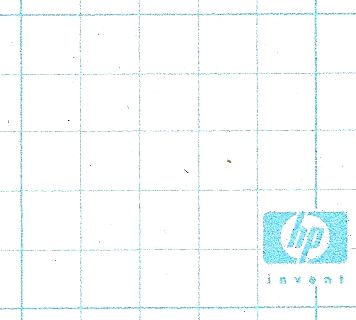
The PhotoSmart has an ability to print various ruled paper forms: lined, todo lists, and graph paper. But what they print for graph paper is merely squared paper:
HP’s non-graph paper
Graph paper’s the stuff with 1mm squares. Personally, I was disappointed that it wouldn’t print log ruled and Smith charts, but that’s just me …

All the printers I’ve ever owned …

bird you can see: hp print test

  • An ancient (even in 1985) Centronics serial dot-matrix printer that we never got working with the CPC464. The print head was driven along a rack, and when it hit the right margin, an idler gear was wedged in place, forcing the carriage to return. Crude, noisy but effective.
  • Amstrad DMP-2000. Plasticky but remarkably good 9-pin printer. Had an open-loop ribbon that we used to re-ink with thick oily endorsing ink until the ribbons wore through.
  • NEC Pinwriter P20. A potentially lovely 24-pin printer ruined by a design flaw. Print head pins would get caught in the ribbon, and snap off. It didn’t help that the dealer that sold it to me wouldn’t refund my money, and required gentle persuasion from a lawyer to do so.
  • Kodak-Diconix 300 inkjet printer. I got this to review for Amiga Computing, and the dealer never wanted it back. It used HP ThinkJet print gear which used tiny cartridges that sucked ink like no tomorrow; you could hear the droplets hit the page.
  • HP DeskJet 500. I got this for my MSc thesis. Approximately the shape of Torness nuclear power station (and only slightly smaller), last I heard it was still running.
  • Canon BJ 200. A little mono inkjet printer that ran to 360dpi, or 720 if you had all the time in the world and an unlimited ink budget.
  • Epson Stylus Colour. My first colour printer. It definitely couldn’t print photos very well.
  • HP LaserJet II. Big, heavy, slow, and crackling with ozone, this was retired from Glasgow University. Made the lights dim when it started to print. Came with a clone PostScript cartridge that turned it into the world’s second-slowest PS printer. We did all our Canadian visa paperwork on it.
  • Epson Stylus C80. This one could print photos tolerably well, but the cartridges dried out quickly, runing the quality and making it expensive to run.
  • Okidata OL-410e PS. The world’s slowest PostScript printer. Sold by someone on tortech who should’ve known better (and bought by someone who also should’ve known better), this printer jams on every sheet fed into it due to a damaged paper path. Unusually, it uses an LED imaging system instead of laser xerography, and has a weird open-hopper toner system that makes transporting a part-used print cartridge a hazard.
  • HP LaserJet 4M Plus. With its duplexer and extra paper tray it’s huge and heavy, but it still produces crisp pages after nearly 1,000,000 page impressions. I actually have two of these; one was bought for $99 refurbished, and the other (which doesn’t print nearly so well) was got on eBay for $45, including duplexer and 500-sheet tray. Combining the two (and judiciously adding a bunch of RAM) has given me a monster network printer which lets you know it’s running by dimming the lights from here to Etobicoke.
  • IBM Wheelwriter typewriter/ daisywheel printer. I’ve only ever produced a couple of pages on this, but this is the ultimate letter-quality printer. It also sounds like someone slowly machine-gunning the neighbourhood, so mostly lives under wraps.
  • HP PhotoSmart C5180. It’s a network photo printer/scanner that I bought yesterday. Really does print indistinguishably from photos, and prints direct from memory cards. When first installed, makes an amusing array of howls, boinks, squeals, beeps and sproings as it primes the print heads.

the great lost opportunity

I’ve always thought that Adobe missed a great opportunity when they didn’t make their basic PDF writer freely available for Windows. Other OSs now have transparent print-to-PDF options. If you’re lucky, a corporate PC might have MS Office Document Image Writer installed, but a 300dpi monochrome TIFF can’t compare to a PDF.

Still, one can always install PDFCreator (if you have admin rights to the PC, of course). It’s a shame they decide to bundle a marginally dodgy toolbar/spyware package with it, but you don’t get that if you use the MSI installer package.

the outside world

Finally got something useful done with the Thinkpad with the broken backlight. Thanks to lots of help from Paul, and a critical bit of advice from Stephen, it’s now living on my network and visible to the outside world.
What had me initially confused was that both my modem (a SpeedTouch 546) and my Netgear router have NAT firewalls. I had to declare the router as a DMZ on my modem, and the Thinkpad a DMZ on my router. Also, the router’s DynDNS support was only reporting its IP address as seen behind the modem, so I had to turn that off and use dynDNS from the modem.

Security hole? Perhaps; but it’s not as if OpenBSD is the least secure or most widely-used OS. I’ve really only got sshd and thttpd running, so there’s not much to chew on