
Instagram filter used: Lo-fi
 I guess the “UV Resistant!” nylon rope I used to rig my mini-G5RV wasn’t that resistant. Two summers of Scarborough sun did for it, turning the casing into friable dust. I knew that buying that big reel of black antenna rope last year was a good idea.
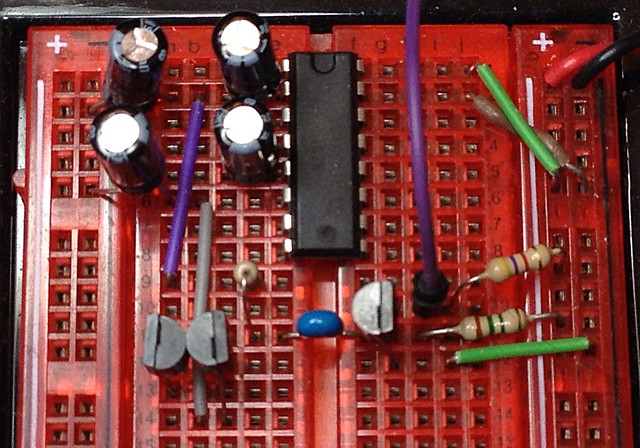
Artisanal Hardware Random Number Generator — scruss
(the Flickr page has used to have popup notes about the circuit.)
Trickles out a few thousand made-with-love organic random numbers per second to the attached Arduino. The circuit is essentially Rob Seward’s True Random Number Generator v1 (after Will Ware, et al) which uses a MAX232 to power two reverse-biased 2N3904s to create avalanche noise. Another 2N3904 amplifies the resulting noise into something an Arduino can sample using AnalogRead(). Many modern processors include hardware RNGs (such as RdRand in recent Intel chipsets) so this circuit is just a toy now.
My interest in random number generators didn’t just arise from yesterday’s post. I’ve had various circuits breadboarded for months gathering dust, so I thought I’d pull out the most successful one and photograph it. Hardware RNGs seem to be a popular hobby electronics obsession, and there are many designs out there in variable states of “working” and/or “documented”. I wanted one that could be powered from the 5V rail of an Arduino, and didn’t use too many expensive components. Rob’s RNG Version 2 circuit and code is the basis, but I replaced the 12V external supply with the MAX232 circuit he used in version 1.
Perhaps the reason that there are so many RNG projects out there in various states of abandonment is that making a good, reliable hardware RNG is hard. Just a few of the things you have to think about are:
(I’d like to thank Peter Todd for providing most of those issues over a pint and a chat during from a keysigning event. Peter saved me from spending too many hours working on this by hinting that — just maybe — I didn’t actually know what I was doing)
If you want to read more on how to build a proper hardware RNG, the article “Understanding Intel’s Ivy Bridge Random Number Generator” and its references make a good (if very technical in places) introduction. I’m nowhere near paranoid enough to experiment further with RNG design, although I do have all the components to build an LM393-based XR232USB.
2026 Thoughts:
Hey! This is a bit old! Things may have changed and I haven’t necessarily fixed them.
Most computers can’t create true random numbers. They use a formula which makes a very long stream of pseudo-random numbers, but real randomness comes from thermal noise in analogue components. The Raspberry Pi has such a circuit in its SoC, as it helps making the seed data for secure transactions. It was only recently that a driver for this circuit was supplied. To enable it (on Raspbian): I think the module is enabled by default now for the different versions of the SoC.
sudo apt-get install rng-toolsThe /dev/hwrng device should now be available, but can only be read by the root user.
Nico pointed out that you also need to:


Random data look pretty dull. Here are random RGB values made with:
sudo cat /dev/hwrng | rawtoppm -rgb 256 256 | pnmtopng > random$(date +%Y%m%d%H%M%S).png
(you’ll need to install the netpbm toolkit to do this.)
Two short WAV samples of, well, noise:
Yup, sounds like static. It was made with the rndsound.sh script. You’ll need to install sox to run it.
If it sounds like static, and even if it sometimes looks like static, it may not actually be true random noise. An infamous case of a pseudo random number generator being not very random at all was RANDU, which at first glance appeared to produce nearly random results, but close study showed it to be very predictable.
I wrote (what I think to be) a C implementation of RANDU: randu.c. While it produces appropriately random-sounding audio data (randu17.wav), if you output it as an image:
 Those stripes are a giveaway; there should be no order in the output. (Then again, I have no idea if I’ve implemented RANDU correctly.) Testing random data is hard, then — you really need a barrage of tests, and even some of them might fail even for truly random output. Thankfully, when you installed rngtools, it included rngtest, a simple checker for random data:
sudo cat /dev/hwrng | rngtest -c 1000
rngtest 2-unofficial-mt.14
Copyright (c) 2004 by Henrique de Moraes Holschuh
This is free software; see the source for copying conditions. There is NO warranty; not even for MERCHANTABILITY or FITNESS FOR A PARTICULAR PURPOSE.
rngtest: starting FIPS tests…
rngtest: bits received from input: 20000032
rngtest: FIPS 140-2 successes: 1000
rngtest: FIPS 140-2 failures: 0
rngtest: FIPS 140-2(2001-10-10) Monobit: 0
rngtest: FIPS 140-2(2001-10-10) Poker: 0
rngtest: FIPS 140-2(2001-10-10) Runs: 0
rngtest: FIPS 140-2(2001-10-10) Long run: 0
rngtest: FIPS 140-2(2001-10-10) Continuous run: 0
rngtest: input channel speed: (min=67.969; avg=921.967; max=1953125.000)Kibits/s
rngtest: FIPS tests speed: (min=842.881; avg=3208.336; max=6407.890)Kibits/s
rngtest: Program run time: 27658884 microseconds
We were lucky that none of the tests failed for that run; sometimes there are a few failures. RANDU, on the other hand fares very badly:
./randu 17 | rngtest -c 1000
rngtest 2-unofficial-mt.14
Copyright (c) 2004 by Henrique de Moraes Holschuh
This is free software; see the source for copying conditions. There is NO warranty; not even for MERCHANTABILITY or FITNESS FOR A PARTICULAR PURPOSE.
rngtest: starting FIPS tests…
rngtest: bits received from input: 20000032
rngtest: FIPS 140-2 successes: 0
rngtest: FIPS 140-2 failures: 1000
rngtest: FIPS 140-2(2001-10-10) Monobit: 730
rngtest: FIPS 140-2(2001-10-10) Poker: 1000
rngtest: FIPS 140-2(2001-10-10) Runs: 289
rngtest: FIPS 140-2(2001-10-10) Long run: 0
rngtest: FIPS 140-2(2001-10-10) Continuous run: 0
rngtest: input channel speed: (min=45.630; avg=14255.221; max=19073.486)Mibits/s
rngtest: FIPS tests speed: (min=23.694; avg=154.238; max=176.606)Mibits/s
rngtest: Program run time: 141071 microseconds
See? Lots of failures there. It’s hardly random at all. If you really want to get out testing randomness, there are the dieharder tests. They takes ages to run, though.
(Note: newish Intel machines also have a real hardware RNG in the shape of Rdrand.)
I trust you all got the obvious Strictly Ballroom reference in the title?
Uhoh. Wonder Pens sells pens — neato pens — and they are in Toronto. The Platinum Preppy they sent me free with my first order writes better than any $4 fountain pen should.
I’ve been at We Saw a Chicken … for 10 years now. From a tiny first post to now, it’s always been filed firmly under “misc.â€: no theme, no ads, no plan, and (until recently) no readers ☹
It’s been on two different hosts and two different platforms. It’s still obscurely named. It took a brief orange-carpeted journey into the 1970s. Dave‘s picture of a tiny bunny in my hands still gets more hits than I can believe. There was the whole WindSave thing, and the whole other pointless and ugly megabins thing. Then there was Raspberry Pi and The Quite Rubbish Clock; I got more hits in a week than I got in the previous nine years.