Category: computers suck

  • ctrl + alt + down

    … may cause hilarity when inflicted on an unsuspecting cow-orker’s PC.
    (ctrl + alt + up fixes it, btw. If it doesnt: you tried something you read on some random blog?!)

  • the drug of the nation, now at your station

    I’m annoyed to see that United Mobile Broadcasting Corp has installed TVs in the GO trains. It will be all ads. As if we don’t have abbotances on the train. I wonder how much of a discount we’ll get on our passes now that GO has all this new revenue?

    I’m particularly sensitive to moving images. I have to be prepared to see them (like in a cinema) else I get disoriented. Maybe I’ll barf on the train.

  • site search broken

    I don’t think that WordPress‘s search function works any more.
    Ah, it’s been fixed in 2.1.2.

  • all atwitter

    Twitter is one of the most pleasantly futile things I’ve ever seen.

  • yay bloggers, it’s cold!

    GTAbloggers tonight. Is there any coincidence that it was absolutely baltic last time, and there aren’t exactly that many brass monkeys hanging around today?

  • all did go well in Sarnia

    Well, I talked myself hoarse (must learn to project!), and I think it went well; no-one feigned death or sudden illness.

    The ATI Remote Wonder performed flawlessly. It may be ugly, but it works.

  • more wind in Sarnia

    I’m giving my wind talk to the Lambton Chapter of the PEO tonight: Wind Energy for the Perplexed.

    If all goes well, I’ll be able to use my ATI Remote Wonder to control the slides, as I found an OS X driver for the Remote Wonder. Yay!

  • um, no …

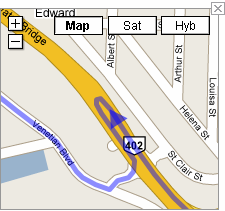
    This is really part of a route suggested by Google Maps:

    gmaps_sarnia_uturn.png

    6. Take the exit onto HWY-402 W toward Sarnia (102 km)
    7. Make a U-turn (0.3 km)

    It should be noted that the 402 is a large highway, and u-turns are not exactly recommended.

  • Fixing bad shares on the NSLU2

    Much as I like my NSLU2, it has a serious problem when it loses power; its share information often goes kablooey. There’s a not very elegant way of fixing this.

    Say, f’rinstance, you had a share called Files on Disk 2. Sometimes you’ll find that this has gone, or migrated to the wrong disk, and there’s invariably a share called Files~1, usually on Disk 1. To fix this:

    • Delete the Files~1 share.
    • If you have a Files share and it’s inaccessible through the normal methods, delete that.
    • Recreate the Files share on Disk 2. Do not change the location, unless you’d put it somewhere strange to start off with.

    Your share should be back. I find that it sometimes usually changes the user permissions, so you may have to fiddle with ownership and group membership. You can fix this:

    1. Delete the user from the Users tab  (but don’t delete the group and share – these are greyed out – and definitely don’t delete the folder)
    2. Delete the group, from the Advanced → Groups tab
    3. Delete the share, from the Advanced → Shares tab
    4. Recreate the user (from the Setup → Users tab), and select Create Private Folder (Share), giving the appropriate location for the share.

    You can then save the configuration to allow you to quickly restore the settings. Nope, the reboot that’s carried out on restore makes the whole problem come back again – aargh!

  • spiff with a silent X

    I’ve been playing with XSPF, mostly so I can use the XSPF Web Music Player. There’s a Perl API for working with XSPF (XML::XSPF) which works well, but is extremely short on documentation.

    Creating a playlist with XML::XSPF is pretty logical: create a new track object for each new track, then feed an array of these tracks into the playlist object. It took me a couple of hours of fiddling about (and much use of Data::Dumper::Simple, the plain man’s guide to tortuous data structures) to find that out.

    The end result is this:
    id32xspf – create XSPF playlist to stdout from a list of MP3s with ID3v2 tags.
    It’s intended for use on a local directory of MP3s, which will subsequently be uploaded to a website. It uses MP3::Info to do the tag work.
    It has some limitations:

    • every file must have ID3v2 tags.
    • it doesn’t handle file:// locations at all well, as their syntax is system-dependent. You’ll probably have to use the --urlbase option. For example, for Unix systems for local files in the current directory, I find -u file://`pwd`/ works well.
    • it doesn’t include track numbers, as I didn’t know that XSPF supported them.
    • it doesn’t create track artwork links, as this isn’t included in ID3 data.

    One slightly amusing caveat about the XSPF Web Music Player is that it doesn’t understand the rate of some of lame‘s more amusing VBR presets. If you feed it files from the voice preset (56kbit, mono, resampled to 32000Hz), the results sound like Pinky & Perky

  • this is not graph paper

    The PhotoSmart has an ability to print various ruled paper forms: lined, todo lists, and graph paper. But what they print for graph paper is merely squared paper:
    HP’s non-graph paper
    Graph paper’s the stuff with 1mm squares. Personally, I was disappointed that it wouldn’t print log ruled and Smith charts, but that’s just me …

  • wordpress dates

    I’m a bit peeved that even in WordPress 2.1, they haven’t fixed a very long-standing bug: all templates (especially the default one) should respect the user’s date format. It seems that moderators on the forums see this as a non-issue, and zealously close (or ignore, if such a passive thing can be done zealously) any discussion on the topic, as has happened here. I don’t need or want to edit PHP to make this work; it’s supposed to work.

    Today’s date is 28 Jan 02007. I want you to see it that way. WordPress doesn’t.

  • spring (!) cleaning

    I’m upgrading Gallery right now, so many of my pictures will be unavailable for a bit. I suspect (but I hope not) that my old deep links into Gallery from the blog will be broken by the upgrade.

  • excel: pasting only visible cells

    Ever tried to paste a range of cells in Excel that included hidden cells, but you didn’t want the hidden stuff? This works: Now Who Told Excel To Paste That Data?

  • All the printers I’ve ever owned …

    bird you can see: hp print test

    • An ancient (even in 1985) Centronics serial dot-matrix printer that we never got working with the CPC464. The print head was driven along a rack, and when it hit the right margin, an idler gear was wedged in place, forcing the carriage to return. Crude, noisy but effective.
    • Amstrad DMP-2000. Plasticky but remarkably good 9-pin printer. Had an open-loop ribbon that we used to re-ink with thick oily endorsing ink until the ribbons wore through.
    • NEC Pinwriter P20. A potentially lovely 24-pin printer ruined by a design flaw. Print head pins would get caught in the ribbon, and snap off. It didn’t help that the dealer that sold it to me wouldn’t refund my money, and required gentle persuasion from a lawyer to do so.
    • Kodak-Diconix 300 inkjet printer. I got this to review for Amiga Computing, and the dealer never wanted it back. It used HP ThinkJet print gear which used tiny cartridges that sucked ink like no tomorrow; you could hear the droplets hit the page.
    • HP DeskJet 500. I got this for my MSc thesis. Approximately the shape of Torness nuclear power station (and only slightly smaller), last I heard it was still running.
    • Canon BJ 200. A little mono inkjet printer that ran to 360dpi, or 720 if you had all the time in the world and an unlimited ink budget.
    • Epson Stylus Colour. My first colour printer. It definitely couldn’t print photos very well.
    • HP LaserJet II. Big, heavy, slow, and crackling with ozone, this was retired from Glasgow University. Made the lights dim when it started to print. Came with a clone PostScript cartridge that turned it into the world’s second-slowest PS printer. We did all our Canadian visa paperwork on it.
    • Epson Stylus C80. This one could print photos tolerably well, but the cartridges dried out quickly, runing the quality and making it expensive to run.
    • Okidata OL-410e PS. The world’s slowest PostScript printer. Sold by someone on tortech who should’ve known better (and bought by someone who also should’ve known better), this printer jams on every sheet fed into it due to a damaged paper path. Unusually, it uses an LED imaging system instead of laser xerography, and has a weird open-hopper toner system that makes transporting a part-used print cartridge a hazard.
    • HP LaserJet 4M Plus. With its duplexer and extra paper tray it’s huge and heavy, but it still produces crisp pages after nearly 1,000,000 page impressions. I actually have two of these; one was bought for $99 refurbished, and the other (which doesn’t print nearly so well) was got on eBay for $45, including duplexer and 500-sheet tray. Combining the two (and judiciously adding a bunch of RAM) has given me a monster network printer which lets you know it’s running by dimming the lights from here to Etobicoke.
    • IBM Wheelwriter typewriter/ daisywheel printer. I’ve only ever produced a couple of pages on this, but this is the ultimate letter-quality printer. It also sounds like someone slowly machine-gunning the neighbourhood, so mostly lives under wraps.
    • HP PhotoSmart C5180. It’s a network photo printer/scanner that I bought yesterday. Really does print indistinguishably from photos, and prints direct from memory cards. When first installed, makes an amusing array of howls, boinks, squeals, beeps and sproings as it primes the print heads.
  • “paste special: values” is special

    This saved me a bunch of time yesterday when I was pasting many sets of values into a spreadsheet: Daily Dose of Excel » Blog Archive » Mouse shortcuts.

  • Costco Photo Centre, part II

    So I got the photos back today. The service is pretty quick; I sent the order at 16:45, and had a ready-for-collection confirmation at 10:41 the next day. After braving the lines at Costco (no fun), I had a look at them.

    The prints are pretty good; colour’s bright, everything’s sharp, and there’s no obvious digital artefacts. But I got a bunch of dupes (maybe those failed uploads didn’t really fail at all). If I needed pictures again in a hurry and cheaply, I might go for Costco, as long as it wasn’t for anything really important.

    I’ll still thinking about a networkable photo-printer, though. CompuSmart had a demo HP Photosmart 8450 for cheap, but it had no cables or PSU, so was pretty useless.

  • Costco Photo Centre: cheap, but stupid

    So I’ve got the holiday photos, and want to print them for those that like that. I’d used Future Shop in the past, but Costco is offering such cheap prints, I thought I’d give them a try.

    Probably a mistake:

    • Their drag and drop uploader is an ActiveX control that only works under IE on Windows. Use any other browser, and you get presented with an old-school HTML form. For 94 pictures, that would get dull quickly.
    • The uploader transmits several images at once. It seems that if any of the uploads should fail, all the files uploading at that time also fail. Uploading a few at a time doesn’t seem to help much; around one in ten files will fail randomly.
    • While the uploader does warn you when an upload fails, it’s up to you to remember which files haven’t worked. Clicking Retry just takes you back to the uploader, and since it’s an embedded applet, there’s no browser history to take you back to note your failed uploads.
    • The albums store files in the order uploaded, and can’t be changed.
    • Long file names get truncated, and then get uselessly used as the title on the back.

    Still, I’ll let you know how it all went when I get the prints in a couple of days.