This saved me a bunch of time yesterday when I was pasting many sets of values into a spreadsheet: Daily Dose of Excel » Blog Archive » Mouse shortcuts.
Category: computers suck
-
Costco Photo Centre, part II
So I got the photos back today. The service is pretty quick; I sent the order at 16:45, and had a ready-for-collection confirmation at 10:41 the next day. After braving the lines at Costco (no fun), I had a look at them.
The prints are pretty good; colour’s bright, everything’s sharp, and there’s no obvious digital artefacts. But I got a bunch of dupes (maybe those failed uploads didn’t really fail at all). If I needed pictures again in a hurry and cheaply, I might go for Costco, as long as it wasn’t for anything really important.
I’ll still thinking about a networkable photo-printer, though. CompuSmart had a demo HP Photosmart 8450 for cheap, but it had no cables or PSU, so was pretty useless.
-
Another of Paul’s Good Ideas
Paul Hart has just launched Relovable: Share kids’ clothes & toys in your area. It’s rather clever.
-
Costco Photo Centre: cheap, but stupid
So I’ve got the holiday photos, and want to print them for those that like that. I’d used Future Shop in the past, but Costco is offering such cheap prints, I thought I’d give them a try.
Probably a mistake:
- Their drag and drop uploader is an ActiveX control that only works under IE on Windows. Use any other browser, and you get presented with an old-school HTML form. For 94 pictures, that would get dull quickly.
- The uploader transmits several images at once. It seems that if any of the uploads should fail, all the files uploading at that time also fail. Uploading a few at a time doesn’t seem to help much; around one in ten files will fail randomly.
- While the uploader does warn you when an upload fails, it’s up to you to remember which files haven’t worked. Clicking Retry just takes you back to the uploader, and since it’s an embedded applet, there’s no browser history to take you back to note your failed uploads.
- The albums store files in the order uploaded, and can’t be changed.
- Long file names get truncated, and then get uselessly used as the title on the back.
Still, I’ll let you know how it all went when I get the prints in a couple of days.
-
definitely clean

iTunes‘ clean/explicit labelling worries me. Shouldn’t I, at the age of Dennis the Communist Peasant, be able to decide what’s good for me? Not merely that, but it takes up a bunch of the song title entry, and they label songs by artists who don’t produce bowdlerised versions. Gah!
-
When you really haven’t chosen not to trust: Citrix, Mac OS X, and Entrust certificates
NB: this article is a few years old, and I haven’t tested any updates since I wrote it. It may still work; who knows?
This is one that the support desk of my employer really should’ve answered, but they gave their usual, “You mentioned Macintosh in your e-mail, so this conversation stops here” response.
Anyway, they’ve just upgraded their Citrix access, and what used to work now gives the rather cruddy response:
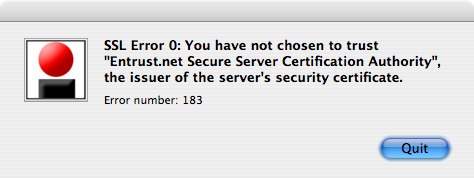
Just what SSL Error 0: You have not chosen to trust “Entrust.net Secure Server Certification Authority”,the issuer of the server’s security certificate. Error number: 183 is supposed to mean to anyone, I don’t know. (Well, actually, I do know, but in rants like this it’s customary to feign ignorance in a huffy manner. Work with me here, people.)
So, to fix this:
- Make sure that Citrix ICA Client is installed
- Go to entrust.net/developer and click on Download Root Certificates
- Select Personal Use, and click on Download Certificates
- Download entrust_ssl_ca.cer and entrust_ssl_ca.der to your desktop
- Open a terminal (it’s in Applications/Utilities), and enter the following:
cd /Applications/Citrix\ ICA\ Client/keystore/cacerts/
cp -p ~/Desktop/entrust_ssl_ca.* .
ln -s entrust_ssl_ca.cer entrust_ssl_ca.crt - Exit the terminal, and try your Citrix session again.
There might be some unnecessary steps there, and this might all be fixed by downloading the latest release of the ICA client, but this works for me now.
-
nostalgia for something that never existed
The Verbatim FlashDisc seems to be a solution without a problem to solve.

It’s a cheap ($4) but very tiny (16MB) USB memory key in the vague form of some kind of magnetic media. There are problems:
- $0.25/MB may seem cheap, but it would mean that a 1GB key at this price was $256
- It neatly blocks most of the USB ports on a machine
- Just what kind of media is it supposed to be? It looks closest to an old spool of mag-tape, but folks buying this wouldn’t remember that.
-
iCaved
Yeah, I caved in and bought a 2GB iPod Nano at the weekend. I had various gift cards and cheques come in, so…
It’s a lot better than the Shuffle was. I still don’t particularly like being tethered to iTunes, but I can live with it.
-
Dexit® INSTEAD? No, Dexit is dead

I see that the number of Dexit terminals has reduced to almost nothing, and now they’re offering refunds of outstanding balance. Looks like it’s dead.
I’ve had a love/hate relationship with Dexit. It was almost a great idea, but offered no significant advantage over cash from the bank machine. I wonder how long it will be before you can buy the old terminals in Active Surplus?
-
that tired, worn-out spam filter feeling?
If your bayesian filter’s no longer doing it for you, zap its database. Sure, you get a couple of days of false positives you have to watch out for, but all those penny-stock scams and “hi, it’s no-one you know” e-mails disappear again. No point in having your filter sticking to the old ways when the spammers and scammers have moved on to new methods.
-
very, very old school
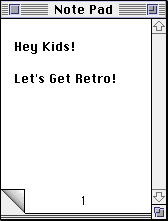
As I appear to have broken Catherine‘s ability to play Crystal Quest by upgrading her eMac to 10.3.9, I need to find an alternative way to run it. I remember running Basilisk II years ago on a very old Linux box — indeed, my ancient instructions are still here: archive.org :: Installing Mac OS 7.5.3 under Basilisk II on Linux, and quite amazingly, are still useful.
I found the following helpful to get it going under OS X:
- Basilisk II, OS X Port, Howtos
- MacOs Emulator at oldos.org
-
hey livejournal, quit claiming my content
Read this. Oddly familiar, huh? It would seem that LiveJournal is republishing my blog on its own site http://syndicated.livejournal.com/wesawachicken/.
The thing about syndicated publishing is that the author has at least given permission that it takes place. I gave LiveJournal no such permission. Sure, I have a public RSS feed, but I don’t expect people just to grab my whole site and publish it for their own ends. That’s not syndication, it’s theft.
They also have the gall to claim there’s a “syndicated user” wesawachicken. Again, I didn’t set that up. I wonder if I can make it implode by getting it to syndicate its own feed? -
Audacity 1.3.2 broken as designed
When I’ve spent the last 3 hours splitting tracks in Audacity, the last thing I want to see is:
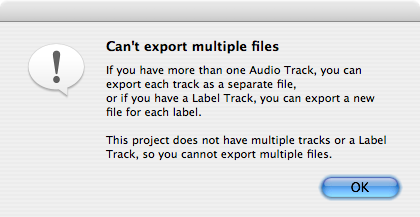
They’ve changed the way that Split works, so you now get a bunch of semi-useless ‘clips’ that you can’t do anything with. You can’t select a clip, or move them to new tracks (at least under Linux and OS X).
How apt that one of the tracks was trying to split was I Wanna Destroy You.
-
look out!
I see that my company’s Outlook Web Access does much niftier things on IE than on FireFox:

You don’t get those options of Firefox. Bah
But in true MS dunderhead fashion, when you quit the mail client, it clears all your cookies — including the ones of sessions on other sites. Microsoft, this isn’t DOS; people multitask these days …
-
outlook contacts to palm, iPod, etc …
This is a neat workaround: Export Outlook Contacts using a small VB script. It works, too — I now have all my work contacts in my Palm.
-
that was easy
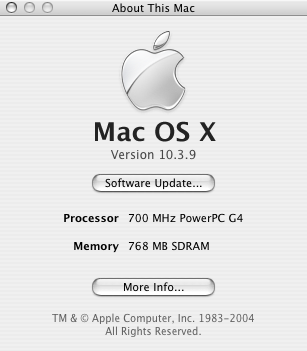
I upgraded Catherine’s eMac last night, which up until then was probably the last Mac on the planet running 10.1. It now talks to the network better, and runs quite a bit faster.