Bill has a blog now: Bill Rickard Banjos.
Blog
-
implicit markup: easy to read, hard to parse
I don’t usually ponder about other people’s blog postings, but Jeff Atwood’s Responsible Open Source Code Parenting reminded me of some of the old wars that the used to be when I was a markup head. Jeff writes about his frustration that John Gruber’s Markdown text-to-html filter:
- hasn’t been updated for some time
- doesn’t quite do exactly what Jeff’s users at Stack Overflow want
- appears to have any changes in its behaviour from v1.0.1 strenuously vetoed by Gruber himself.
Markdown is nice in that you can write screeds of text, and it does almost exactly what you’d expect. The markup doesn’t get in the way, usually. The difficulty arises when implicit markup (indented lines for quoted text, bulleted lists, highlights) has to give way to explicit (cross-references, code samples). Explicit markup is ugly, but sometimes, you’ve got to do it. Complex intent requires complex modes of communication, and sometimes plain text just hasn’t the bandwidth. [As an aside, there was a hilarious lengthy recurring episode on John Mark Ockerbloom‘s late bookpeople mailing list where a user (mercilessly skewered here)Â insisted that they could write a general Gutenberg plain-text converter that would re-create typeset quality in an e-book reader with no explicit markup, and that XML was completely unnecessary and ill-conceived. The un-markup language, called zen markup language (said user had an aversion to the shift key) lives on only in a single website: the home of z.m.l. As for XML, its executive assistant had no comment on the matter.] Looking at Markdown, it looks like Gruber’s moved on from it. He made a 1.0.1 which did what he wanted. The code’s there to change if anyone needs it. I understand his frustration at people wanting to make changes and still call it Markdown; I’d be annoyed if I had text which I thought was in one format suddenly not be accepted, or do something unexpected. Seriously, that’s almost as bad as ‘deprecated‘. [At least Gruber didn’t go on a deletion rampage, like (admittedly smaller-time) erstwhile CHDK stalwart Barney Fife did when he was slighted in a forum. Looks like almost everything he contributed to CHDK has been removed, including some very useful control scripts and explanations.] Personally, when I need to make text to web conversions, I still use txt2html and a bunch of shell and Perl glue to feed to tidy. It’s on its third maintainer, doesn’t do much, but does it simply. And I’m pretty simple that way.
Update: see also On my increasing exasperation with Markdown.
-
oh dear …
At the meeting Van Zyl agreed to turn off the tower with immediate effect to assess whether the health problems described by some of the residents subsided. What Craigavon residents were unaware of is that the tower had already been switched off in early October – six weeks before the November meeting where residents confirmed the continued ailments they experienced.
-
image rollover in wordpress, no plugins required
I’m seeing quite a bit of traffic to this post. I suppose I should explain that this was a quick hack to see if I could get image rollover to work on a friend’s wordpress.com hosted blog (and no, I couldn’t). This little example doesn’t do preloading, either, and I really don’t have any intention to develop this further. Sorry …

<img title="this" onmouseover="this.src='http://scruss.com/wordpress/wp-content/uploads/2010/01/that.png';" onmouseout="this.src='http://scruss.com/wordpress/wp-content/uploads/2010/01/this.png';" src="http://scruss.com/wordpress/wp-content/uploads/2010/01/this.png" alt="" width="192" height="116" />
This does not work on wordpress.com hosted blogs; it gets stripped out.
Update: You probably want to install the plugin Ultimate TinyMCE, which does the job rather well.
-
Recoverfab – for all your memory card recovery needs
NB to readers: I am not the Recoverfab guy. I can’t help you recover images.
A friend has baby pictures on an SD card, which said baby later found and used as an inappropriate teething aid. Yeah, yeah, I know …
He asked me to try to get the pictures back. I couldn’t read the card. It even fried one of my card readers. I tried RescuePRO, PhotoRec and PhotoRescue: no dice. Downtown Camera returned it as unreadable (and declined to charge me anything).
So I asked metafilter, and someone suggested Recoverfab in Germany. I sent the card off last week, and waited …
Got an e-mail at 06:30 this morning that they’d received the card, with a latest completion date of a week. Before 09:00, received a second e-mail with a link to picture samples and payment options. Have paid (not cheap – €89, but they got results) and am awaiting the FTP link.
Many thanks to Leopold Hiersche for his excellent results.
-
mirrored along eglinton avenue i suppose it would look like an elevation of a hershey’s kiss
Ward 35 is a weird shape:
 Map shape files are from toronto.ca | Open.
 -
OpenEI – Organizing the World’s Energy Information
This looks like fun, especially when you see the sponsors: OpenEI – Organizing the World’s Energy Information.
-
perhaps a slightly easier way to make SD cards bootable for CHDK under OS X
Now that CHDK has a working beta in the source tree for my Canon PowerShot SD790is, I actually have to prepare SD cards for it. The Bootable SD card – OS X instructions seem a bit contrived, so I took a look at the linux instructions, and modified them accordingly. These instructions should work for FAT16-formatted SD cards of 2GB capacity and under. It will not work for SDHC cards, which are generally formatted to FAT32.
This is all command-line only for here on in. It seems to work. Please note that you will be modifying raw file systems with root permissions here; there is no safety net. If you b0rk your main hard drive, don’t say I didn’t warn you.
Firstly, you’re going to have to find out where the SD card in mounted. Do this with:
df
I got:Filesystem 512-blocks Used Available Capacity Mounted on /dev/disk0s2 487463200 318749896 168201304 66% / devfs 222 222 0 100% /dev map -hosts 0 0 0 100% /net map auto_home 0 0 0 100% /home /dev/disk2s1 3969280 3328 3965952 1% /Volumes/CANON_DC
There are three important concepts to note when looking at the mounted card:
- The mount point (or volume) – in this case
/Volumes/CANON_DC. This is the location that you see in Finder when moving files around. - The filesystem – here
/dev/disk2s1. This is the partition on the disk, arranged according to a certain formatting scheme like MS-DOS FAT16. - The disk device – which for me is
/dev/disk2. This is the disk device itself, and it may contain several filesystems.
Your locations for these three could well be different, so please substitute your values.
You’ll need to unmount the device, as writing to a raw filesystem while the OS thinks it has control often results in hilariously unexpected results. I used the OS X-specific command
diskutil unmount /Volumes/CANON_DC
You should get a message like
Volume CANON_DC on disk2s1 unmounted. Now you need to write the boot instruction:echo -n BOOTDISK | sudo dd bs=1 count=8 seek=64 of=/dev/disk2s1
This will prompt you for your password.
If you need to, you can remount the filesystems on the card with
diskutil mountDisk /dev/disk2
(Note that we used the disk name here, not the filesystem. If there were several partitions on the disk, this command would mount all of them that it could. It’s also kinda handy for remounting USB devices that you’ve accidentally ejected from Finder.)
Update: Knowing a difficulty getting the firmware update method of getting CHDK to work on a Mac? Running a Leopard or newer machine? Then you need to learn all about Apple’s quarantine attribute and how to remove it with
xattr: FAQ/Mac – Still having trouble?. - The mount point (or volume) – in this case
-
no ironic dying from dysentery, either
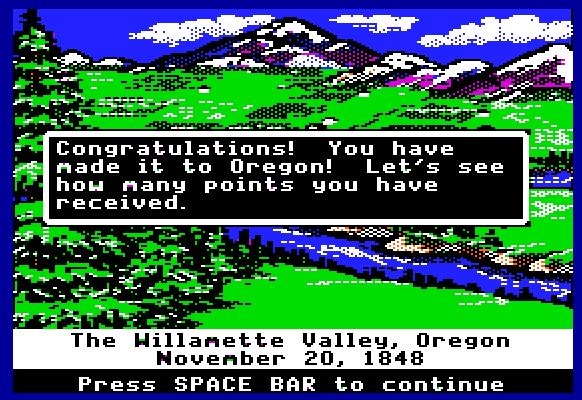
… and here’s me never played it before, too. You can play it too, at Virtual Apple ][.
-
BaroBax – Baba To Ki Hasti
http://www.youtube.com/watch?v=zDC50v6UujE
-
wwdbd?
Q: What would David Byrne do?
A: Be David Byrne. -
this document has layers
Never noticed this tiny icon in Adobe Acrobat Reader:

Looks kinda weird when enlarged:

-
in which Joe re-enacts his mother’s response to his father and sister’s canoe capsizing on the Des Moines River in 1982
Joe
http://scruss.com/wordpress/wp-content/uploads/2010/01/VID-00001-20100102-1930.3gp -
Low-tech Magazine: Urban windmills harm the environment
Not sure I entirely agree, but Low-tech Magazine: Urban windmills harm the environment.
-
to scan film, or not
I’ve recently taken up film photography again. But processing is expensive.
To have 24 exposures processed and scanned at 6MP at Downtown Camera costs $12 + tax. That’s a pretty good price for black and white.
I can process at home (yay stinky toxic chemicals!) for a bit less. I’d need to buy a scanner, and the cheapest film scanners come in at around $300.
What to do, what to do?
-
Unstable airline passenger ignites self; none hurt
I try very hard not to write about the news; it affects me so little, yet frequently annoys me.
All that media noise about that guy on that plane. So much passenger delay will ensue.
Of course he was unstable. Killing yourself and others for a cause is not rational.
Of course he’d claim connections to Al Qaeda. He’s unstable, wants to sound badass.
Of course Al Qaeda would claim him as one of their own. What, would you turn down the free publicity?
So, the subject of this entry is how I think it should have been reported. Move on, people; there’s real news to be reported.
-
missöüri bird cälls
oh, itunes …