- Go to <http://toronto.craigslist.org/>
- Enter your search term in the “search craigslist” box
- When you get the results, scroll to the bottom. There is a final paragraph that says “RSS (?)”. Copy the RSS link address (move the mouse pointer over the RSS link, right click, and select “Copy Shortcut”)
- Open an new window (Ctrl-N in IE)
- In the new window, go to <http://www.rssfwd.com/>
- Paste the link you copied from craigslist into the “Enter a feed to subscribe” box – the link should look something like <http://toronto.craigslist.org/search/sss?query=this%20that&format=rss>, and hit Subscribe
- Enter your e-mail address on the next page – before you hit Subscribe again, you might want to check the preview of the feed that’s shown on the page to see that it’s finding what you want. You probably want to keep the e-mail type as “Normal – Send each update as individual e-mails”, and uncheck the “Share at Popular Feeds” page
- You will get a confirmation e-mail – hit the confirm link, which will take you to a page you probably don’t need to understand
- rssfwd should mail you within a couple of hours of new items being posted. Each e-mail should have unsubscription information
Category: computers suck
-
how to get craigslist searches by e-mail
-
obsolescence: the failing …
One of my backup drives on the NSLU2 started to fail (it won’t always spin up), so I nipped into Canada Computers and bought a 320GB replacement for a moderate number of $. Swapped the old drive out of the Vantec NexStar case, and — nothing.
Seems that the first-gen NexStars only support up to 250GB. Looks like I’m off to the computer store tomorrow.
-
thanks, spammer. thammer.
A (now deleted) comment:
hello , my name is Richard and I know you get a lot of spammy comments, I can help you with this problem. I know a lot of spammers and I will ask them not to post on your site. It will reduce the volume of spam by 30-50%. In return Id like to ask you to put a link to my site on the index page of your site. The link will be small and your visitors will hardly notice it, its just done for higher rankings in search engines. Contact me icq 454528835 or write me tedirectory@yahoo.com, i will give you my site url and you will give me yours if you are interested. thank you
Gee, thanks, Richard! That would be so helpful of you!
-
Amazon.ca: view your gift certificate balance
Very strange; amazon.ca doesn’t officially let you see your gift certificate balance (though they claim you can from the help pages). You can see your balance if you go here: https://www.amazon.ca/gp/css/account/payment/view-gc-balance.html. (You might want to copy the URL and paste it so you can see there’s no trickery going on when you are asked for your password.)
This is just the amazon.com balance page with the .com changed to .ca, but there’s no link from the Your Account page.
-
can’t get here from there
I was trying to send a largish promotional image to our marketing department yesterday. It was too big for e-mail, so I put it on the department share, assuming that marketing could read it. Nope. Moved it to a company FTP site. User has no access to ftp. In the end, I had to send it on a CD, even though I’m pretty sure it originated somewhere inside the company.
I also had to point an (internal) reviewer to an engineering report on our servers. Again, it’s on a share – you know, those things that people are supposed to be able to, y’know, read. No dice. I think the reviewer ended up requesting hardcopy from the original consultant, even though I know the file’s on a server in the very same building as the reviewer. Aagh!
If one company that spends a truckload on IT can’t get communications right, there is no hope for us.
-
Lady Goosepelt Rides Again!

In case anyone wants them, the 600 dpi page images of What a Life! are stored in this PDF: what_a_life.pdf (16MB). If you merely wish to browse, all the images from the book are here.
I got a bit carried away with doing this. Instead of just smacking together all the 360 dpi TIFFs I scanned seven years ago, I had to scan a new set at a higher resolution, then crop them, then fix the page numbers, add chapter marks, and make the table of contents a set of live links.
I’ve got out of the way of thinking in PostScript, so I spent some time looking for tools that would do things graphically. Bah! These things’d cost a fortune, so armed only with netpbm, libtiff, ghostscript, the pdfmark reference, Aquamacs, awk to add content based on the DSC, and gimp to work out the link zones on the contents page, I made it all go. Even I’m impressed.
One thing that didn’t impress me, though:
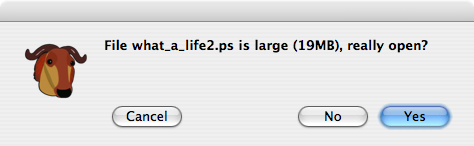
I used to edit multi-gigabyte files with emacs on Suns. They never used to complain like this. They just loaded (admittedly fairly slowly) and let me do my thing. Real emacs don’t give warning messages.
-
Display or hide zero values – Excel – Microsoft Office Online
Display or hide zero values – Excel – Microsoft Office Online
You may have a personal preference to display zero values in a cell, or you may be using a spreadsheet that adheres to a set of format standards that requires you to hide zero values. There are several ways to display or hide zero values. -
go train!
I found one of the little pluggie-innie dealies that attach to an iBook power adaptor on the GO train yesterday. This is convenient, for my own pluggie-innie dealie got bent and no longer works.
-
good news spam story
In 2005, it took 45 hours for an unprotected e-mail address to pick up spam. In 2007, it takes 123 hours. An address I published on 6 August at 11:00 picked up its first spam on 11 August at 13:55.
Maybe I’m not comparing like with like, as the name I used in 2005 (Olaf) is a real name. This year’s test used “aelmkizk”, which is unlikely to be a proper name. Maybe my site’s less popular.
-
doesn’t rule my web
Lots of people are drooling over the book Rule the Web. I’m not, particularly. It’s good in parts, but reminds me so much of those mid-late 1990s “Best Web Directory Ever” tomes that are currently propping up shelves in bargain bookstore, and propping up houses built on landfills in Arizona.
My biggest complaint is its US-centric approach. Pretty much everything related to buying, selling or finding people or things mentioned in the book only applies to the USA.
As is the way when web meets paper, some things are out of date already. It happens, but it’s a shame when the book’s pretty new in the shops.
I did find a couple of things I genuinely didn’t know about, but might find useful:
- Combine PDFs, for slicing and dicing PDFs under OS X. (I could do this with pdftk, but Combine PDFs is purty).
- The Freesound Project is a collaborative database of Creative Commons licensed sounds. When I next need a comic boing, I’ll know where to look.
It also gave links to OnyX and HandBrake, both of which I already use. But that’s about it. I’d have been peeved if I bought the book (yay, Toronto Public Library!), as this is more of a basic manual than a compendium of coolness.
-
Looks like it
It’s that time again: aelmkizk@scruss.com.
-
the beast of the bios
I now have a 16:9 LCD monitor for the front room computers. The Ubuntu box needed a little reconfiguration of the X Server to work perfectly, though I think the bandwidh for 1440*900 might be a bit high for my old KVM, as I’m getting some sparklies on solid colour.
The mini-ITX box was another story. It resolutely refused to see the wider screen. Then I found out I had to update the BIOS. Yuk.
Since Catherine is of the teacherly profession, she bought a USB floppy drive with her iMac five years ago. The drive hasn’t seen much use, but it was essential here. First I had to find a floppy that worked (discarded a couple), then I found that Windows XP’s “make bootable floppy” option doesn’t actually make a disk that boots. I had to go off to bootdisk.com to find a super-minimal floppy boot image. Once I got that, I installed the bios tool and the flash image onto the floppy, and rebooted.
At this point I got really annoyed. The bios tool linked from all the VIA pages is too old to recognize the new bios file format, so exits with “It is not Award BIOS” error message. Once I found the right link (thanks, filupn), I was in business. Or was I?
I then discovered that my SP13000 had its BIOS protect jumper on. This meant dismantling the box. For most PCs, it’s not such a big deal, but for mini-ITX, it’s a horror. I had to remove the DVD drive, the hard drive, the PCI card and riser and many cables just to get down to the motherboard. Putting it all back together was hard, with the expected amount of squtcha, squtcha‘ing on the cables to get everything in.
The BIOS upgrade, the machine rebooted, and now all I need to do is update the graphics driver. Unfortunately, there are many that are described as the VIA/S3G Unichrome Pro Integrated Graphics Driver. Argh.
-
excel: alpha code to numbers
I use an annoying program that labels its output A..Z, AA..AZ, BA … rather than numerically from 1. This is annoying, as a spreadsheet won’t sort it correctly (it does A, AA, AB …). The following code will convert this code to the right numbers, assuming your alpha code is in cell B3:
=IF(LEN(B3)=1,CODE(B3)-64,26*(CODE(B3)-64)+CODE(RIGHT(B3))-64)This will only work for codes of two characters or less, and is case sensitive.
-
Almost as good as “Keyboard Missing: Press F1” …
Bought an RJ Tech DVD player today because it has VGA output, and we have a spare 19″ monitor. It seems that you need a composite video display to be able to use the on-screen menu to select VGA Out on this unit. This is teh smrt programming.
Update: Yup, the RJ Tech RJ-800DVX does need to have the VGA output enabled from a composite video source. This is very strange, as the composite does seem to work with the VGA enabled, so why not enable both out the box? I’m glad I still had my Plextor TV tuner from my abortive attempts to run a PVR. I hooked it up to the PC and DVD player, fiddled with it until I got an image, then selected VGA video output. It works beautifully now, playing every region of DVD, MP3 CD, and downloaded MPEG I can throw at it.
Update #2: Just got this e-mail from RJ Tech:
N/P won’t solve the problem.
You need to press V-mode to change the dvdplayer setting to VGA mode.I’m sure I did this and it didn’t work, but props to RJ Tech for answering in one business day for a $50 player.
Update #3 – 12 August:Â I’m now on my third RJ-800DVX. The first one fell over last night, with no disk being recognized and a nasty screeching sound as it tried to seek. The one I got in return from Canada Computers was DOA with the same problem. The new unit is quite different – it has a much cheaper looking remote, and now has a SCART socket as well as VGA on the back. This one works, for now at least.
-
spent too much time in the henhouse
The Chuckie Egg Professional’s Resource Kit (warning: loud embedded YouTube video of the BBC B version) is a worryingly complete website about Chuckie Egg. You don’t know Chuckie Egg?
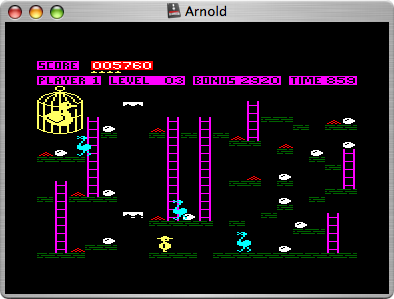
 You should. I’ve probably spent more time playing this than any other computer game. It was even my workhorse for testing how quickly my fast tape loading routines worked on the Amstrad (I think I got somewhere north of 9000 baud on a good tape, and it loaded back more than once, so – success!)
There are emulators and versions for just about every computer made, so go nuts.
-
disnaeland
Conclusive proof (if any were needed) that Scotland invented Unicode:


If you try to display a UTF-8 apostrophe on an ISO 8859-15 system, you get a reasonable representation of didnae, isnae and wasnae.