1332 Artists / 774 Albums / 12074 Tracks / 27.1 Days / 47.34 GB
— and the sad thing is, this would barely half fill a current iPod.
Category: computers suck
-
song counts
-
ripping dvd audio with Ubuntu
With more than a little help from How to Rip DVD audio to mp3 or ogg — Ubuntu Geek, here’s how I’d rip audio from a DVD:
for f in $(seq 1 12)

do

  transcode -i /dev/sr1 -x null,dvd -T 1,$f,1 -N 0x1 -y null,wav -m $(printf "%02d" $f).wav

done
Your track count and device name will vary. You’ll note that I caved, and used the annoying $(…) syntax instead of good old-fashioned backticks (which some youngsters will claim are deprecated, but I claim as job security). WordPress munges those badly, so we’re stuck with the ugly.
You could use livemp3 to convert to mp3s (if I remembered to upload the version that handles wav files) under controlled circumstances. -
emusic: where Canada still means more expensive and second-rate
I’m not going to get all Swindleeeee!!!!! about it, but I’ve noticed a few things missing in the new emusic Canada site. I lost all my MP3s in the break-in, but I thought I’d downloaded all of the ones I’d bought from emusic a couple of days ago.
Not so. For unexplained reasons, I got humming The Whole House is Singing, and I thought I needed to listen to some Alasdair Roberts. Couldn’t find it in the share, so I went back to emusic to download it again, and rats!, it’s gone. So here’s some music I’ve paid for, but now emusic (champions of no-DRM) can’t make good on their promise to let you re-download everything you’ve bought.
(I’ve also noticed that most of the Deva Premal tracks [hey, they’re Catherine‘s] have gone, but have had no compulsion whatsoever to hum them …)
-
gimp windows crash
If you find that GIMP for Windows crashes frequently, try installing the GTK+ for Windows Runtime Environment. It seems to fix many of the instabilities for me.
-
rockin’ the plastic: four turntables and an mp3 share
Now I’ve got the Soundbridge set up to share from my server, I’ve been ripping CDs like crazy. I’ve got two drives on my Ubuntu box, and hooked an external CD drive to my laptop, so I’m rocking four drives at once. After years of using Grip, I converted to Abcde this weekend. What I really like about it is that I can run multiple copies at once, and it very nearly things right (aka “my way”) out of the box.
By the end of tonight, I should have about 6700 tracks on my share, and a bunch of CDs in storage.
-
oh yeah, that’s what I’m talkin’ about
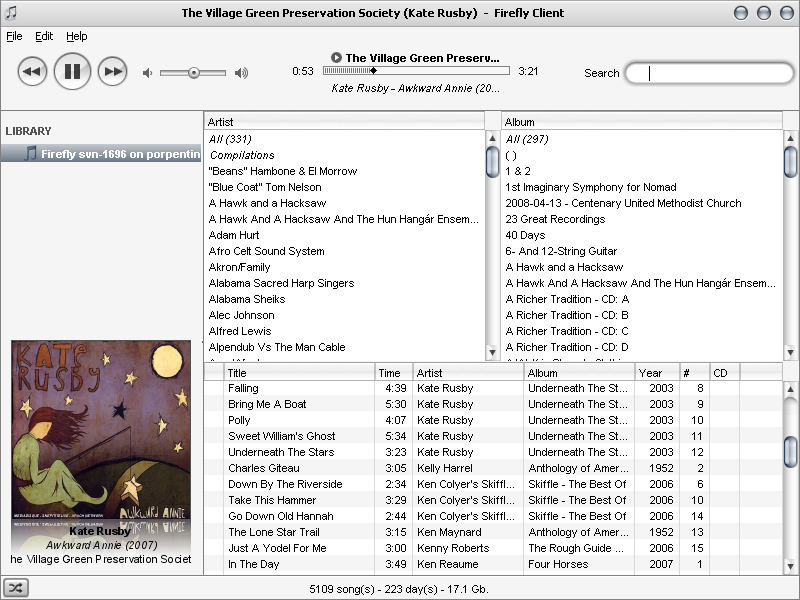
This is my work PC running Firefly Client, serving my music from home. Who needs to install and manage local music libraries now? -
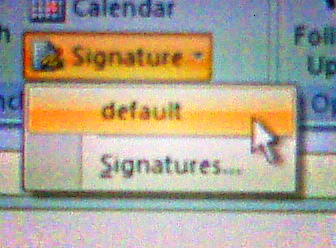
default means default, microsoft
When I’ve specified the default e-mail signature, I shouldn’t have to click on another drop-down called default to make it appear in my Outlook message:
-
it is good
I just installed Firefly Media Server and it is good.
-
combines the snark with the useful
Down for everyone or just me? helps you tell if a site’s working, or if it’s just your router. I could’ve used this earlier in the week, as I frantically fiddled with my router until I noticed the crew working on the pole line …
-
bbtrackerwpt – create GPX files of named waypoints from bbtracker
I like bbtracker -it’s a very simple GPS track logger for the Blackberry. It has (at least, at the current version) one problem – you can’t create waypoints in the way that most GPS applications would expect. You can, however, name trackpoints – so I wrote a little perl script to extract all the named trackpoints from an exported GPX files, and save them as waypoints.
Download bbtrackerwpt – converts named trackpoints from bbtracker GPX into waypoints. You’ll need XML::Simple for this to work.
I imagine this script has a limited audience, and quite likely a limited lifetime. The author of bbtracker has said they’d provide waypoint support in the next version. You know me and patience, though …
If I remembered more XSLT, I’d have done this the proper way. As is, I create XML using Perl
printstatements. I’m probably okay, as the name field is the only piece of free-form text, and I do some rudimentary escaping of characters that XML doesn’t like. The output seems to validate, which is more than the GPX that bbtracker produces does. The length of your GPS track may vary 😉 -
Make Link
Make Link :: Firefox Add-ons copies the current page as a link. Just like that.
-
wordpress can’t count: my 2000th blog posting
I was all exited about my 2000th post, because the dashboard is showing:

So I decided to tabulate my entries by number, and discovered that I really have 2261 (well, 2262 now) blog entries. This is the real story:
The numbering seems to have gone sideways in the last 1000 entries; entry #1000 is, as they say, what it is.
-
I don’t know what it did, but I wish it hadn’t done it
Outlook has now decided that I need all my e-mail text in huge. I have no idea why.

-
rsync to an NSLU2
My only real complaint with my Linksys NSLU2 is that it doesn’t have a very accurate clock. Tools like rsync expect identical timestamps, or flag source and destination files as different. This causes most of your files to be rewritten, even though the source and destination are in fact the same.
This fixes it:rsync --size-only -av src dest -
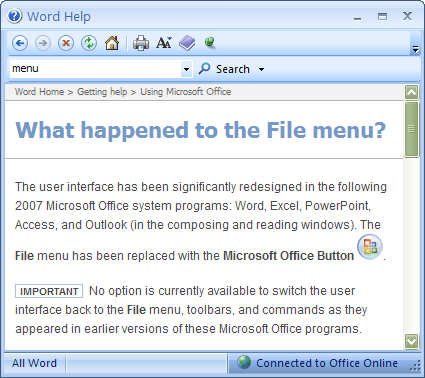
this is me hating on Office 2007
MS Office’s menus may have been a mess, but that’s no reason to replace them with something equally complex but different.
-
auplabels – extract times of tracks in an Audacity file for adding labels
auplabels – extract times of tracks in an Audacity file for adding labels (download).
Audacity 1.3’s method of track splitting has always seemed a pain, so I wrote the above to help me.
Running
auplabels file.aupwill generate a somewhat sparse file of track offsets:0.00000000
191.57333333
376.08000000
550.76000000
…You’ll want to edit this to add track names (there should be a tab between the first column and the title):
0.00000000Â Â Â Â Â Battle of the Blues
191.57333333Â Â Â I Quit My Job
376.08000000Â Â Â Ain't Goin' My Way
550.76000000Â Â Â Wake Up Hill
…If you use File -> Import… -> Labels… to import this into your project, the label track should exactly align with your track splits.
(Of course, this should really be an XML application since Audacity AUP files are XML, but issues were had.)
-
how to fix the annoying Ubuntu/Debian XML::SAX install problems
Debian and its derived distributions have a policy about packages not being able to modify the configuration of other packages. While this might generally seem like a good idea, for the TIMTOWTDI world of Perl, this causes problems.
The problem arises if you have installed Perl XML modules from both CPAN and the Debian (or Ubuntu, or whatever) repositories. Debian’s modifications subtly break the XML::SAX module, on which most Perl XML modules (including the brilliant XML::Simple) depend. If you’ve been naughty and used a module from CPAN, Debian gets its knickers in a knot, and won’t configure or run anything remotely related to libxml-sax-perl.
If you get the error Can’t locate object method “save_parsers_debian” via package “XML::SAX” at /usr/bin/update-perl-sax-parsers line 90, your system is affected. You might get the clue that any of your Perl XML handlers freak out and fail in weird ways.
Here’s a method (there’s always more than one, of course)Â to fix it. This was combined from a couple of sources, each of which was on the right track but didn’t entirely work. Actually, the first might’ve been right on the money, but my hiragana’s a bit ropey …
- make sure you’ve got your system up to date with
apt-getoraptitude. sudo cpan CPANPLUS(this will ask you lots of questions, to which you should almost always answer with the default)sudo cpanp -u XML::SAX(this takes quite a while, and produces no output for most of it)LC_ALL=C sudo apt-get install --reinstall libxml-sax-perl(theLC_ALL=Cmight not be strictly necessary, but it worked for me)
You must remember never to pretend to be smarter than the Debian maintainers, and suitably chastened, may now return to your normal OpenSSH patching activities …
- make sure you’ve got your system up to date with
-
mind you
I did just upgrade my server from the previous version of Ubuntu LTS to 8.04 LTS, and it went without a glitch. I had to edit one config file, and it’s all running smoothly.