Posts Tagged ‘email’

memo to self

Saturday, September 27th, 2008

Yes, I really have opted out from the MAKE e-mail list. If I get any more e-mail, O’Reilly — formerly publishers of useful Unix books with animals on them — are just a bunch of filthy spammers.

default means default, microsoft

Tuesday, July 22nd, 2008

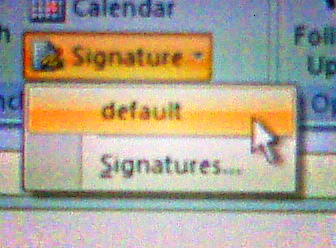
When I’ve specified the default e-mail signature, I shouldn’t have to click on another drop-down called default to make it appear in my Outlook message:

happiness

Monday, March 3rd, 2008

is an empty inbox

once mighty edifices crumble and fall

Friday, February 15th, 2008
Friends:

After discussion with the other list managers, we've decided to end
our policy of asking that list members not "top post" their replies.
That's the default behavior of most email clients, and just reminding
people of our recommendation to "bottom post" or interleave your
replies has become more trouble than its worth. From this point
forward, top posting is no longer an issue.

Dan Knight, list owner
publisher, LowEndMac.com

a great what?

Thursday, December 6th, 2007

Just got an e-mail which signs off, “Thanks and have a great.”

auto-CC’ing someone with Outlook

Thursday, October 18th, 2007

If you’ve ever forgotten to cc someone on an e-mail and you’re forced to use Outlook, this could be useful.
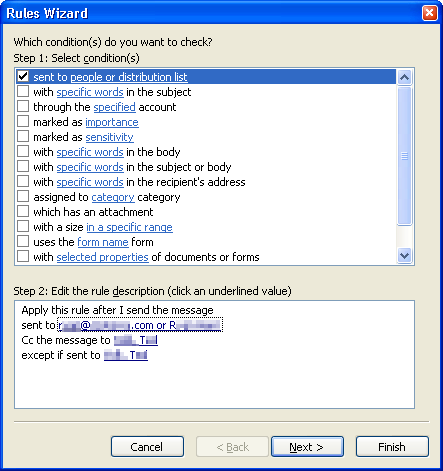
Real example: R is an external contractor. T manages R’s company’s account for us, but isn’t involved in all communications with R. By setting up an outgoing mail filter, I can ensure that all mail I send to R is copied to T.
The Rules wizard lives in the Tools menu, and the option called (I think) “Rules & Filters”:

setting up a mail send rule in Outlook

This particular example is made more complex by R’s having two e-mail addresses. Multiple addresses in the distribution list become a logical-or, so it works out. I’m not sure if I strictly needed the exclusion clause to only cc T if T is not explicitly in the To: or Cc: fields, but it works.

Outgoing filters only work if Outlook is running, so won’t work if you are not logged in.

how to get craigslist searches by e-mail

Monday, September 10th, 2007
  1. Go to <http://toronto.craigslist.org/>
  2. Enter your search term in the “search craigslist” box
  3. When you get the results, scroll to the bottom. There is a final paragraph that says “RSS (?)”. Copy the RSS link address (move the mouse pointer over the RSS link, right click, and select “Copy Shortcut”)
  4. Open an new window (Ctrl-N in IE)
  5. In the new window, go to <http://www.rssfwd.com/>
  6. Paste the link you copied from craigslist into the “Enter a feed to subscribe” box - the link should look something like <http://toronto.craigslist.org/search/sss?query=this%20that&format=rss>, and hit Subscribe
  7. Enter your e-mail address on the next page - before you hit Subscribe again, you might want to check the preview of the feed that’s shown on the page to see that it’s finding what you want. You probably want to keep the e-mail type as “Normal - Send each update as individual e-mails”, and uncheck the “Share at Popular Feeds” page
  8. You will get a confirmation e-mail - hit the confirm link, which will take you to a page you probably don’t need to understand
  9. rssfwd should mail you within a couple of hours of new items being posted. Each e-mail should have unsubscription information

Looks like it

Monday, August 6th, 2007

It’s that time again: aelmkizk@scruss.com.

45 hours, you’re spammed!

Monday, July 4th, 2005

I placed a new and valid e-mail address on my blog on Friday, July 1st, 02005 at 13:55:59. On Sunday, July 3rd, 02005 at 11:03:43, I received a spam e-mail from MiddleEastTenders@tender234.com, subject Qatar Tenders. That’s a few hours shy of two days, from post to spam.

Those spammers certainly don’t hang around. I wasn’t expecting it to be that quick. Conclusion of this story? Don’t ever let anyone publish your e-mail address on the web, ever.

experiment

Friday, July 1st, 2005

I’ll explain later…

olaf@scruss.com

Another cool thing about WordPress

Monday, August 30th, 2004

…. is that you can e-mail in blog entries. Like this one.