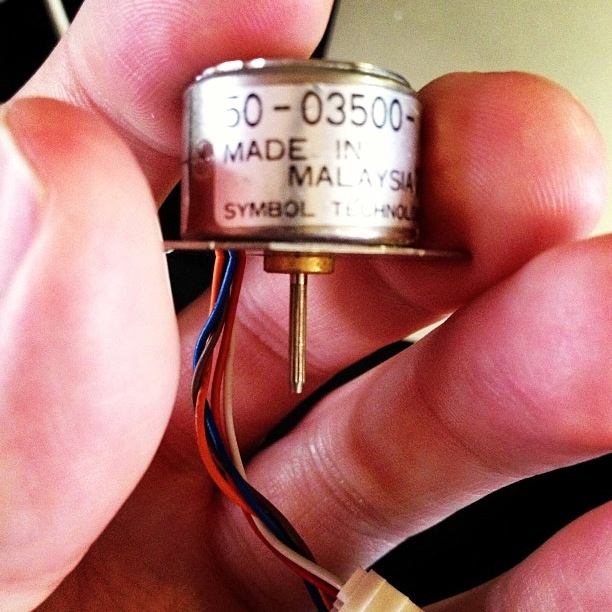
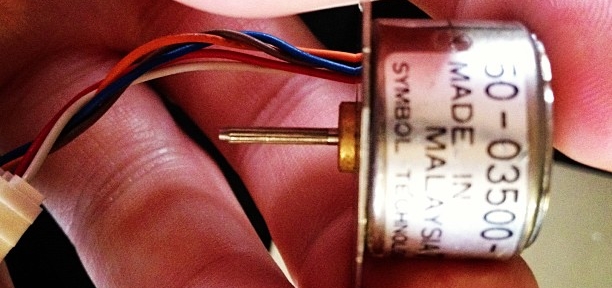
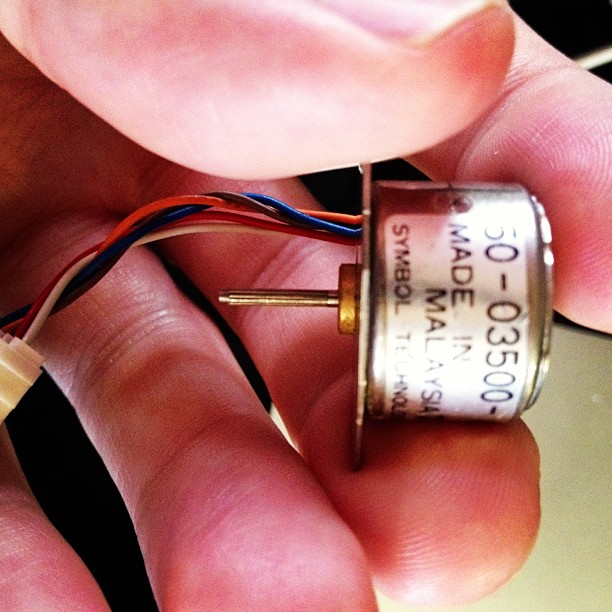
Active Surplus Electronics is the best. I was wanting to learn about driving stepper motors from a microcontroller, but didn’t want to spend a lot or rig up a complex power supply. Active Surplus had a bin of tiny 5V stepper motors at under $3 each. The one I bought is marked:
50-03500-    028
MADE IN
 MALAYSIA   7115
SYMBOL TECHNOLOGIES, INC.
I have no data sheet, but I’ve been able to work out that it’s a unipolar stepper motor, 20 steps/revolution (18°/step; quite coarse), wired:
Centre tap: Brown
Coil A: White, Red
Coil B: Orange, Blue
It’s small enough to be driven directly by USB power through an Arduino and the Adafruit Motor Shield. No idea how much torque this thing puts out, but it can’t be much.
(Setting up my motor shield was a pain, as I’d accidentally put non-stacking headers on it. This required an hour of swearing-filled desoldering; lead-free through-hole desoldering is just the worst*. With wick and solder pump, I finally managed to clear everything up well enough to fit the new headers.) (more…)
Hey! This article is really old! So old, in fact, that I clearly thought that saying (ahem) “w00t w00t†was a good idea. Information here may be misleading and possibly wrong. You probably want to be using a newer client library and you definitely want to use an Arduino IDE ≥ 1.6 and not the ancient one that comes with Raspbian.
pyFirmata‘s documentation is, to be charitable, sparse. After writing Raspberry Pi, Python & Arduino *and* a GUI (which should be making an appearance in The MagPi soon, w00t w00t yeet!), I looked at pyFirmata again to see what it could do. That pretty much meant digging through the source.
Firmata can drive hobby servos, and if you’re not driving too many, you can run them straight from the Arduino with no additional power. I used a standard cheapo-but-decent Futaba S3003, which gives you about 180° of motion. The particular one I tried started to make little growly noises past 175°, so in the example below, that’s hardcoded as the limit.
#!/usr/bin/python
# -*- coding: utf-8 -*-
# move a servo from a Tk slider - scruss 2012-10-28

import pyfirmata
from Tkinter import *

# don't forget to change the serial port to suit
board = pyfirmata.Arduino('/dev/tty.usbmodem26271')

# start an iterator thread so
# serial buffer doesn't overflow
iter8 = pyfirmata.util.Iterator(board)
iter8.start()

# set up pin D9 as Servo Output
pin9 = board.get_pin('d:9:s')

def move_servo(a):
    pin9.write(a)

# set up GUI
root = Tk()

# draw a nice big slider for servo position
scale = Scale(root,
    command = move_servo,
    to = 175,
    orient = HORIZONTAL,
    length = 400,
    label = 'Angle')
scale.pack(anchor = CENTER)

# run Tk event loop
root.mainloop()
The code above makes a slider (oh, okay, a Tkinter Scale widget) that moves the servo connected to Arduino pin D9 through its whole range. To set the servo position, you just need to write the angle value to the pin.
I haven’t tried this with the Raspberry Pi yet. It wouldn’t surprise me if it needed external power to drive the Arduino and the servo. This might be a good excuse to use my Omega-328U board — it’s Arduino code compatible, runs from an external power supply, and has Signal-Voltage-Ground (SVG) connectors that the servo cable would just plug straight into.
I would have been posting more Raspberry Pi posts, but my latest Made-in-UK 512MB board seems to have a raft of problems. Left to its own devices, it will happily corrupt any SD card I put in it. This is some fairly typical dmesg output:
[36218.109865] mmc0: final write to SD card still running

[36228.126345] mmc0: Timeout waiting for hardware interrupt - cmd12.

[36228.127534] mmcblk0: error -110 sending stop command, original cmd response 0x900, card status 0x900

[36248.152121] mmc0: final write to SD card still running

[36258.163655] mmc0: Timeout waiting for hardware interrupt - cmd12.

[36258.164865] mmcblk0: error -110 sending stop command, original cmd response 0x900, card status 0x900

[36269.084446] mmc0: final write to SD card still running

[36279.101766] mmc0: Timeout waiting for hardware interrupt - cmd12.

[36279.102953] mmcblk0: error -110 sending stop command, original cmd response 0x900, card status 0x900

[36309.899006] mmc0: Timeout waiting for hardware interrupt - cmd25.

[36309.899047] mmc0: resetting ongoing cmd 25DMA before 4096/4096 [84]/[96] complete

[36309.902774] mmcblk0: error -110 transferring data, sector 1721928, nr 848, cmd response 0x900, card status 0xc00

[36309.902964] mmc0: DMA IRQ 6 ignored - results were reset

[36309.903200] end_request: I/O error, dev mmcblk0, sector 1722649

[36309.903227] end_request: I/O error, dev mmcblk0, sector 1722656

...

[36309.903462] end_request: I/O error, dev mmcblk0, sector 1722768

[36309.903823] Aborting journal on device mmcblk0p2-8.

[36310.460263] journal commit I/O error

[36310.653420] EXT4-fs error (device mmcblk0p2): ext4_journal_start_sb:327: Detected aborted journal

[36310.667118] EXT4-fs (mmcblk0p2): Remounting filesystem read-only
Perhaps the only disadvantage of riding a Dutch bike like my Batavus is that it uses so many parts that are unknown outside Europe. Simple things like replacing the batteries in the rear light are much harder than they need to be. There are no manuals in English for these parts, and since Batavus’s guidelines start and end at “Take it to your bike shop”, it’s not much help.
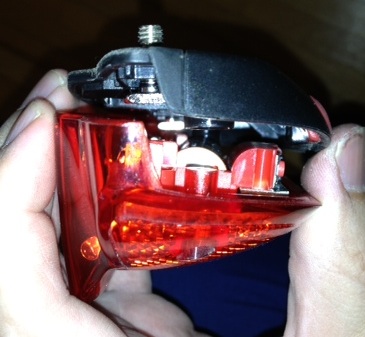
The low battery light on my rear LED had just started to glow, so I had to replace the batteries. With no discernible way in, this was tricky. You have to unscrew the two Phillips screws on the reflector, and kind of slide the reflector and batteries straight back and off:
It would be a lot easier to leave the light on the carrier, as it would give you a tonne more leverage. There’s a thumbnail indentation at the bottom of the light to help with this removal, but I had to use a small plastic drift from my electronics toolkit. (Please excuse my manky nails in the picture; I’d been gardening.)
My light says it’s a “Smart Co., Ltd TL271R//RC” on the back, and may be sold under other brands. It’s suspiciously similar to the Move Shaphire 271 rear light. I’m not really complaining — this is the first new set of batteries I’ve had to fit since I bought the bike in February 2009.
Update: hey, who knew? Even folks from the Netherlands are searching for this blog entry. That’s if my site stats for “move fietslicht batterij vervangen” are to be believed …
Withered Hand is one of my favourite artists. Today, I found out that one of his first EPs was for Paul Carter, my childhood friend who died in 2006. Paul’s artwork is on the cover.
I know a lot of people who bought the Texas Instruments MSP430 LaunchPad development kit but never really got into it. I’m one of them; the $4.30 purchase price was compelling, but the requirement to install a huge proprietary IDE (with its own embedded C dialect) was just too much.
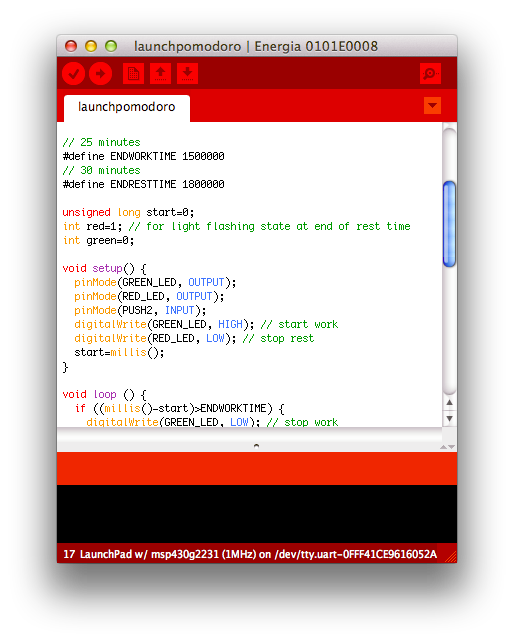
For this reason, Energia is great. It’s a fork of the Wiring/Arduino development environment for the MSP430. Looks just like Arduino, but quite red:
The basics of the language are the same, although the pin names and functions are different from the Arduino. The basic board also has a red and a green LED, a user button, and the obligatory reset button.
Just to try out Energia, I wanted a useful project that only used the onboard hardware. I came up with a version of a pomodoro timer, similar to the one used in The Pomodoro Technique® time management method. The one I made has the following features:
25 minute “green light” work period
5 minute “red light” rest period
At the end of the rest period, the green and red lights flash. You can choose to restart the timer (with the reset button), or turn the lights off with the user button.
You can turn the timer off at any time with the user button, and restart it from zero with the reset button.
For me, this electronic version has several advantages over the wind-up official timer:
It does have a couple of possible disadvantages, though:
it doesn’t give an indication of time left
it’s not very accurate, since it uses the MSP430’s internal oscillator. Mine seems to give an approximately 26 minute work period, with a rest time that’s proportionally longer.
Here’s the code (tested on a MSP-EXP430G2 board, version 1.4):
/*

 launchpomodoro - simple task/rest timer for TMS430/Energia

 On reset: Green LED on for 25 minutes
 After 25 minutes: Red LED
 After 30 minutes: Flashing Red/Green LED (until reset)
 On button press: all lights off.

 scruss - 2012-10-15

 */

// 25 minutes
#define ENDWORKTIME 1500000
// 30 minutes
#define ENDRESTTIME 1800000

unsigned long start=0;
int red=1; // for light flashing state at end of rest time
int green=0;

void setup() {
  pinMode(GREEN_LED, OUTPUT);
  pinMode(RED_LED, OUTPUT);
  pinMode(PUSH2, INPUT);
  digitalWrite(GREEN_LED, HIGH); // start work
  digitalWrite(RED_LED, LOW); // stop rest
  start=millis();
}

void loop () {
  if ((millis()-start)>ENDWORKTIME) {
    digitalWrite(GREEN_LED, LOW); // stop work
    digitalWrite(RED_LED, HIGH); // start rest
  }

  if ((millis()-start)>ENDRESTTIME) {
    flicker(); // warn that we've overrun
  }

  if (digitalRead(PUSH2) == LOW) { // push quiet/off switch
    off();
  }
}

void flicker() { // toggle LEDs and wait a bit
  red=1-red;
  green=1-green;
  digitalWrite(GREEN_LED, green);
  digitalWrite(RED_LED, red);
  delay(333);
}

void off() { // appear to be off
  digitalWrite(GREEN_LED, LOW); // lights off
  digitalWrite(RED_LED, LOW);
  while (1) { // loop until reset
    delay(50);
  }
}
Update, 2026: If you must mess with optar, this fork looks like it will build better: colindean / optar
I’ve spent most of the day messing around with Twibright Optar, a way of creating printed archives of binary data that can be scanned back in and restored. It looks like it was written as a proof-of-concept, as the only way to change options is to modify the code and recompile. Eppur si muove.
To compile the code on OS X, I found I had to change this line in the Makefile from:
LDFLAGS=-lm
to
LDFLAGS=-lm `libpng-config --L_opts`
After trying to print some samples at the default resolution, I had no luck, so for reliability I halved the data density settings in the file optar.h:
#define XCROSSES 33 /* Number of crosses horizontally */
#define YCROSSES 43 /* Number of crosses vertically */
It’s quite important that your image prints and scans with a whole number of printer dots to image pixels. This used to be quite easy to do, before the advent of PDF’s “Scale to fit” misfeature, and also printer drivers that do a tonne of work in the background to “improve” the image. Add the mismatch between laser printer resolutions (300, 600, 1200 dpi …) and inkjets (360, 720, 1440 dpi …), and you’ve got lots of ways that this can go wrong.
Thankfully, there’s one common resolution that works across both types of printers. If you output the image at 120 dpi, that’s 5 laser printer dots at 600 dpi, or six inkjet dots at 720 dpi. And there was peace in the kingdom.
Here’s a demo, based on this:
So I took this track (which I used to have as a 7″, got at a jumble sale in the mid-70s) and converted it to a really low quality MPEG-2.5: MichelinJingle8kbit — that’s 175KB for just shy of three minutes of music (which, at this bitrate, sounds like it’s played through a layer of socks at the bottom of the Marianas Trench, but still).
Passing it through optar (which I wish wouldn’t produce PGM files; its output is mono) and bundling the pages into a PDF, I get this: optar_mj.pdf (760KB). Scanning that printout at 600dpi and running the pages through unoptar, I got this: optar1_mj.mp3. It’s the same as the input file, except padded with zeros at the end.
Sometimes, the scanning and conversion doesn’t do so well:
mjoptar300dpi.mp3 — this is what happens when you scan at too low a resolution.
mjx.mp3 — I have no idea what went wrong here, but: glitchtastic!
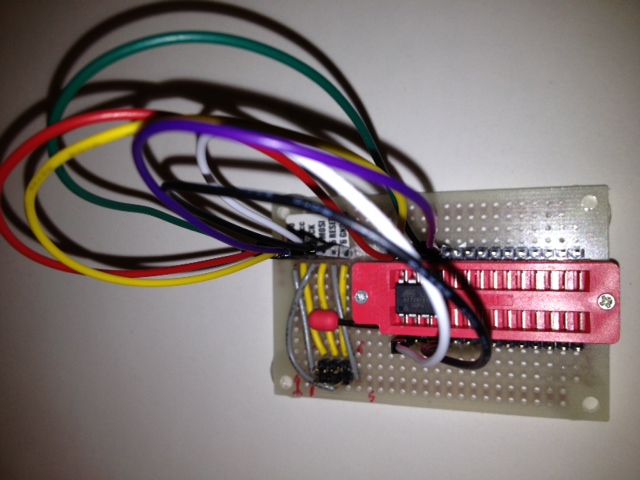
It’s amazing what you can do when you raid your parts bin …
Featuring fully configurable M-F jumpers so I can program (pretty much) any Atmel ATTiny microcontroller up to 28 pins. Might be able to do some ATMegas too.