How Ink Is Made, from The Printing Ink Company, Rycoline Inc.
(via)
So, Netflix Canada launched today. As a (fairly) loyal Zip.ca subscriber, I was worried, but to be honest, I can do without putting DVDs in the mail every week. Since we can watch Netflix on the Wii, I thought I’d sign up for a trial month.
I tried to find things I’d want to see. Netflix is drawing blanks. I took my list of 30 movies I have queued at Zip to see how they compare. It’s not so good:
| # | Title | Zip.ca | Netflix |
| 1 | A Single Man | ✓ | ✗ |
| 2 | The Dish | ✓ | ✗ |
| 3 | Becoming Jane | ✓ | ✗ |
| 4 | October Sky | ✓ | ✓ |
| 5 | Playtime | ✓ | ✗ |
| 6 | The Commitments | ✓ | ✗ |
| 7 | The Cove | ✓ | ✗ |
| 8 | Storytelling | ✓ | ✗ |
| 9 | Jay And Silent Bob Strike Back | ✓ | ✗ |
| 10 | Princess Mononoke | ✓ | ✗ |
| 11 | Kiki’s Delivery Service | ✓ | ✗ |
| 12 | Whisper of the Heart | ✓ | ✗ |
| 13 | Salesman | ✓ | ✗ |
| 14 | Festival Express | ✓ | ✗ |
| 15 | Fat Girl (A ma soeur!) | ✓ | ✗ |
| 16 | Adam | ✓ | ✗ |
| 17 | Micmacs (Micmacs à tire-larigot) | ✓ | ✗ |
| 18 | A Chorus Line | ✓ | ✗ |
| 19 | This is England | ✓ | ✓ |
| 20 | Crumb |
✓ | ✗ |
| 21 | The Harold Lloyd Comedy Collection | ✓ | ✗ |
| 22 | Old-Time Banjo Styles | ✗ | ✗ |
| 23 | Learning Mountain Dulcimer | ✗ | ✗ |
| 24 | Animation Greats! | ✗ | ✗ |
| 25 | Black Cat, White Cat | ✗ | ✗ |
| 26 | Northfork | ✗ | ✗ |
| 27 | Leningrad Cowboys: Total Balalaika Show | ✗ | ✗ |
| 28 | The Turning Point | ✗ | ✗ |
| 29 | Winter’s Bone | ✗ | ✗ |
| 30 | Hum Dil De Chuke Sanam | ✗ | ✗ |
| Available | 70% | 7% |
The unavailable titles at Zip are ones they know about, and will try to find. Not surprisingly, all of them are also not available from Netflix. The only ones I could watch at Netflix are October Sky and This Is England. And would you credit it, but didn’t the DVD for October Sky just arrive yesterday …
Look, I know it’s early days, but Netflix needs to get a bunch better in the next 30 days. Oh, and it could do with some CanCon – it’s very weak there.
YouTube – The Statesmen – Roo-buh-doo-buh-doo.
Thanks(?) to Bill Russell, who played this for me once in 1987, and I haven’t forgotten it.
There were some flaws in the post HSV colour cycling LED on Arduino. This does much more what I wanted:
/* HSV fade/bounce for Arduino - Stewart C. Russell - scruss.com - 2010/09/19 Wiring: LED is RGB common cathode (SparkFun sku: COM-09264 or equivalent)     * Digital pin  9 → 165Ω resistor → LED Red pin     * Digital pin 10 → 100Ω resistor → LED Green pin     * Digital pin 11 → 100Ω resistor → LED Blue pin     * GND → LED common cathode. */ #define RED                9 // pin for red LED; green on RED+1 pin, blue on RED+2 pin #define DELAY              2 long rgb[3]; long rgbval, k; float hsv[3] = {   0.0, 0.5, 0.5 }; float hsv_min[3] = {   0.0, 0.0, 0.4 // keep V term greater than 0 for smoothness }; float hsv_max[3] = {   6.0, 1.0, 1.0 }; float hsv_delta[3] = {   0.0005, 0.00013, 0.00011 }; /* chosen LED SparkFun sku: COM-09264  has Max Luminosity (RGB): (2800, 6500, 1200)mcd  so we normalize them all to 1200 mcd -  R  1200/2800  =  0.428571428571429   =   109/256  G  1200/6500  =  0.184615384615385   =    47/256  B  1200/1200  =  1.0                 =   256/256  */ long bright[3] = {   109, 47, 256 }; void setup () {   randomSeed(analogRead(4));   for (k=0; k<3; k++) {     pinMode(RED + k, OUTPUT);     rgb[k]=0; // start with the LED off     analogWrite(RED + k, rgb[k] * bright[k]/256);     if (k>1 && random(100) > 50) {       // randomly twiddle direction of saturation and value increment on startup       hsv_delta[k] *= -1.0;     }   } } void loop() {   for (k=0; k<3; k++) { // for all three HSV values     hsv[k] += hsv_delta[k];     if (k<1) { // hue sweeps simply upwards       if (hsv[k] > hsv_max[k]) {         hsv[k]=hsv_min[k];       }        }     else { // saturation or value bounce around       if (hsv[k] > hsv_max[k] || hsv[k] < hsv_min[k]) {         hsv_delta[k] *= -1.0;         hsv[k] += hsv_delta[k];       }     }     hsv[k] = constrain(hsv[k], hsv_min[k], hsv_max[k]); // keep values in range   }   rgbval=HSV_to_RGB(hsv[0], hsv[1], hsv[2]);   rgb[0] = (rgbval & 0x00FF0000) >> 16; // there must be better ways   rgb[1] = (rgbval & 0x0000FF00) >> 8;   rgb[2] = rgbval & 0x000000FF;   for (k=0; k<3; k++) { // for all three RGB values     analogWrite(RED + k, rgb[k] * bright[k]/256);   }   delay(DELAY); } long HSV_to_RGB( float h, float s, float v ) {   /*      modified from Alvy Ray Smith's site:    http://www.alvyray.com/Papers/hsv2rgb.htm    H is given on [0, 6]. S and V are given on [0, 1].    RGB is returned as a 24-bit long #rrggbb    */   int i;   float m, n, f;   // not very elegant way of dealing with out of range: return black   if ((s<0.0) || (s>1.0) || (v<0.0) || (v>1.0)) {     return 0L;   }   if ((h < 0.0) || (h > 6.0)) {     return long( v * 255 ) + long( v * 255 ) * 256 + long( v * 255 ) * 65536;   }   i = floor(h);   f = h - i;   if ( !(i&1) ) {     f = 1 - f; // if i is even   }   m = v * (1 - s);   n = v * (1 - s * f);   switch (i) {   case 6:   case 0: // RETURN_RGB(v, n, m)     return long(v * 255 ) * 65536 + long( n * 255 ) * 256 + long( m * 255);   case 1: // RETURN_RGB(n, v, m)     return long(n * 255 ) * 65536 + long( v * 255 ) * 256 + long( m * 255);   case 2: // RETURN_RGB(m, v, n)     return long(m * 255 ) * 65536 + long( v * 255 ) * 256 + long( n * 255);   case 3: // RETURN_RGB(m, n, v)     return long(m * 255 ) * 65536 + long( n * 255 ) * 256 + long( v * 255);   case 4: // RETURN_RGB(n, m, v)     return long(n * 255 ) * 65536 + long( m * 255 ) * 256 + long( v * 255);   case 5: // RETURN_RGB(v, m, n)     return long(v * 255 ) * 65536 + long( m * 255 ) * 256 + long( n * 255);   } }Â
 It’s hard to call anything “breakaway” when the combined current ages of the proponents would put them born in the same week as Lord Rayleigh. The major schism would be over who had the more outlandish hat: radar station vs lampshade.
I notice that TheSource.ca has the BlueLine PowerCost Monitor at a good price. I also notice that the PowerCost uses 433MHz wireless, for which you can get a 433MHz Receiver Shield for Arduino. People have used this to receive data from home weather stations.
It’s just a smop before I have my own network-connected meter now …
Mike Rowe sent me a pre-production prototype of the Chester Banjo capo.
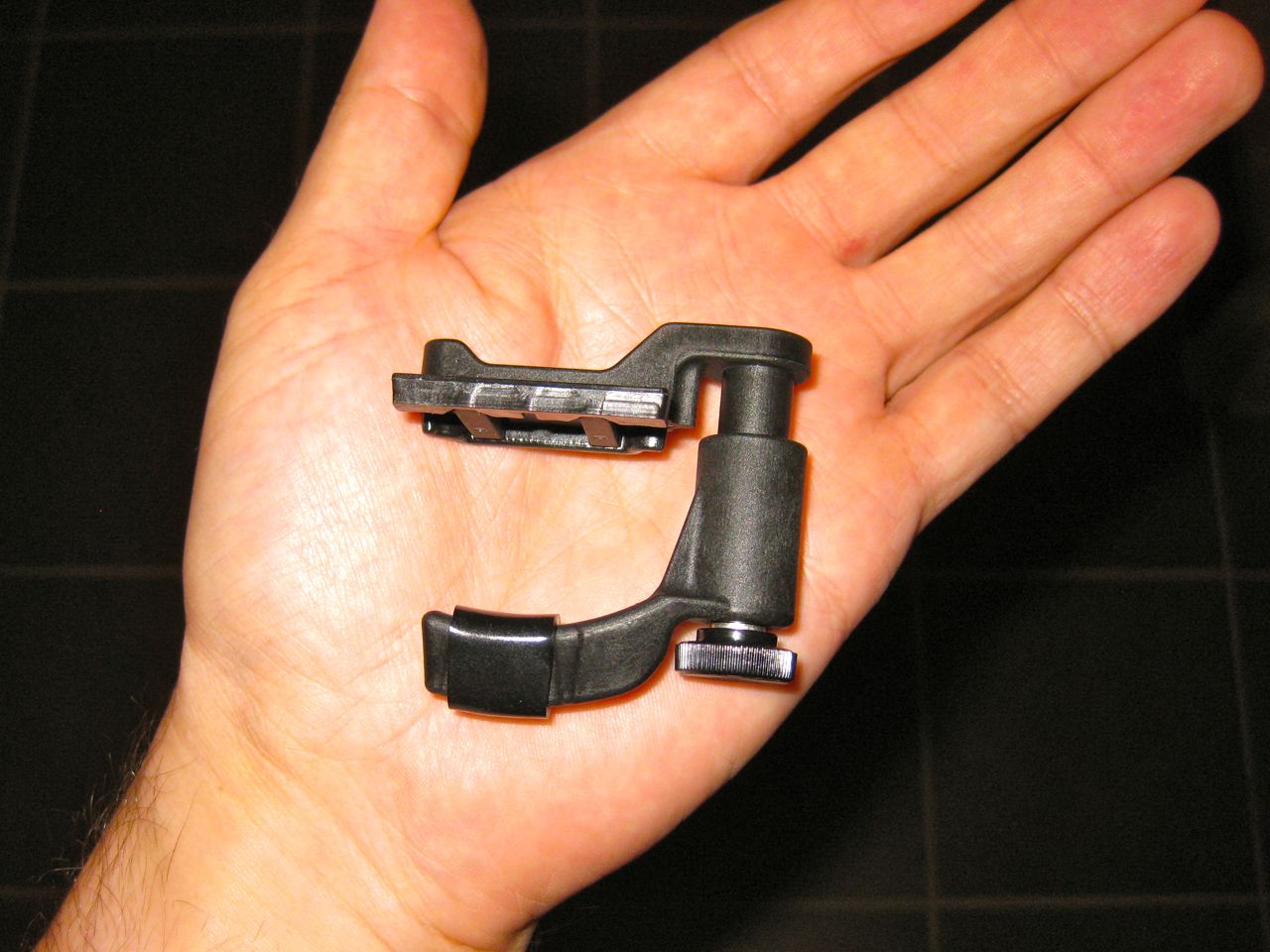 It’s rather cleverly made from glass-filled nylon. This early version hasn’t had the mould polished, so it has a matte finish. It’s very light, uses a very precise (if a smidge slow) thumbscrew to tighten it, and clamps down in two places on the fretboard.
This two-point contact means that it doesn’t pull the strings so far out of tune as a regular capo. You can shift the Rowe capo about a lot before you need to retune. Being a long neck banjo player, I capo a lot. Any extra weight on the banjo isn’t welcome either.
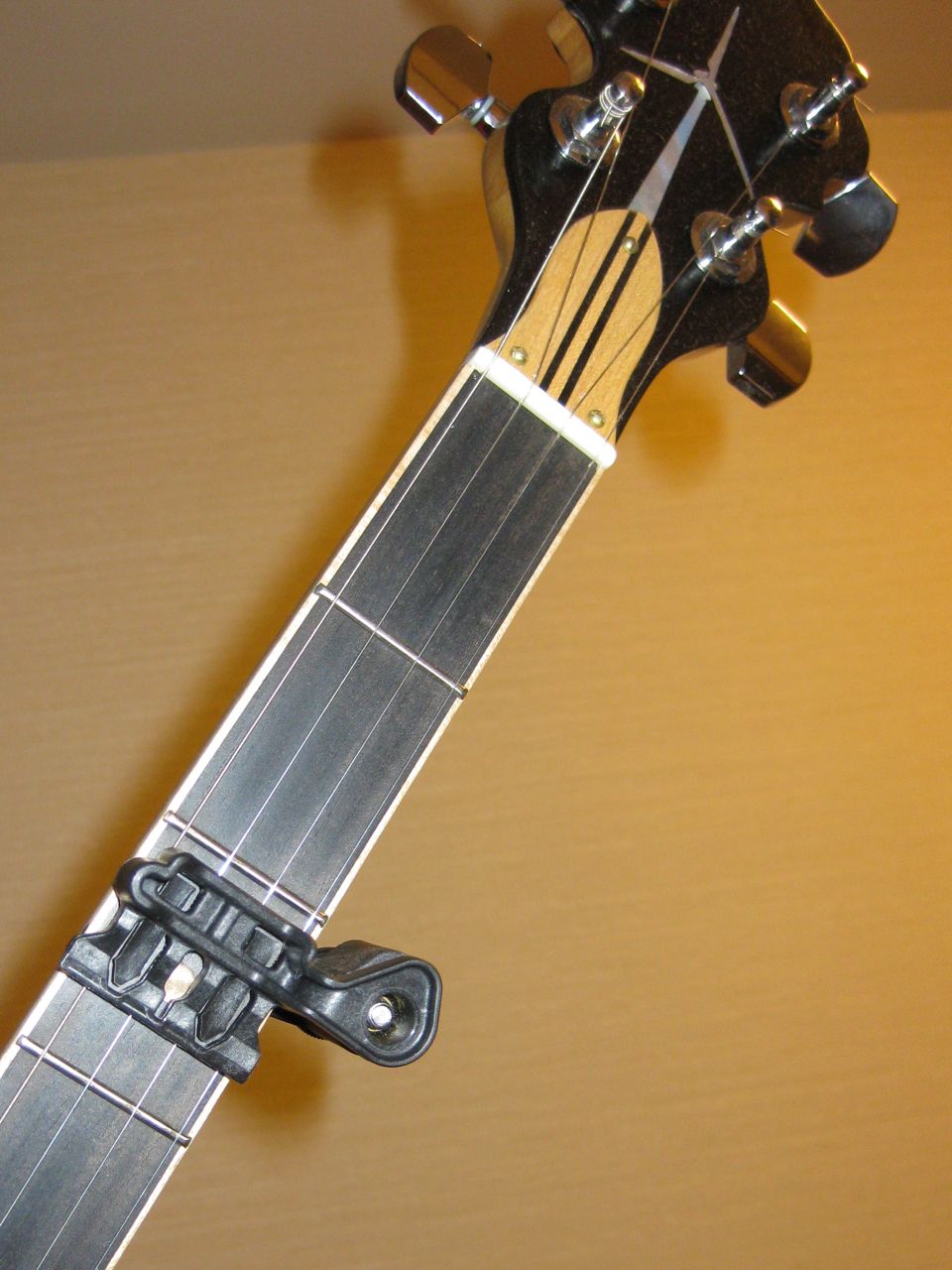 It works best quite far back from the fret. Some familiarity is required to get just the right tone, else string buzz can be a problem. Tweak down the screw and level the capo, and all should be bright again.
One really neat thing about the Rowe capo is its shape. It allows you to use it very far up the neck, and you can still fit your hand in. Here’s me playing what I think is an F# chord with the banjo capo’d to C# at the 9th (long neck) fret:
 Plenty of room for my hand. I rather like the Rowe capo, and many thanks to Mike for letting me try it out.
Pretty much everyone tries the RGB colour cycler when they get their first Arduino. This variant cycles through the HSV colour wheel, though at fixed saturations and values.
Code:
// HSV fade/bounce for Arduino - scruss.com - 2010/09/12
// Note that there's some legacy code left in here which seems to do nothing
// but should do no harm ...

// don't futz with these, illicit sums later
#define RED       9 // pin for red LED
#define GREEN    10 // pin for green - never explicitly referenced
#define BLUE     11 // pin for blue - never explicitly referenced
#define SIZE    255
#define DELAY    10
#define HUE_MAX  6.0
#define HUE_DELTA 0.01

long deltas[3] = {
  5, 6, 7 };
long rgb[3];
long rgbval;
// for reasons unknown, if value !=0, the LED doesn't light. Hmm ...
// and saturation seems to be inverted
float hue=0.0, saturation=1.0, value=1.0;

/*
chosen LED SparkFun sku: COM-09264
 has Max Luminosity (RGB): (2800, 6500, 1200)mcd
 so we normalize them all to 1200 mcd -
 R  1200/2800  =  0.428571428571429   =   109/256
 G  1200/6500  =  0.184615384615385   =    47/256
 B  1200/1200  =  1.0                 =   256/256
 */
long bright[3] = {
  109, 47, 256};

long k, temp_value;

void setup () {
  randomSeed(analogRead(4));
  for (k=0; k<3; k++) {
    pinMode(RED + k, OUTPUT);
    rgb[k]=0;
    analogWrite(RED + k, rgb[k] * bright[k]/256);
    if (random(100) > 50) {
      deltas[k] = -1 * deltas[k]; // randomize direction
    }
  }
}

void loop() {
  hue += HUE_DELTA;
  if (hue > HUE_MAX) {
    hue=0.0;
  }
  rgbval=HSV_to_RGB(hue, saturation, value);
  rgb[0] = (rgbval & 0x00FF0000) >> 16; // there must be better ways
  rgb[1] = (rgbval & 0x0000FF00) >> 8;
  rgb[2] = rgbval & 0x000000FF;
  for (k=0; k<3; k++) { // for all three colours
    analogWrite(RED + k, rgb[k] * bright[k]/256);
  }
  delay(DELAY);
}

long HSV_to_RGB( float h, float s, float v ) {
  /* modified from Alvy Ray Smith's site: http://www.alvyray.com/Papers/hsv2rgb.htm */
  // H is given on [0, 6]. S and V are given on [0, 1].
  // RGB is returned as a 24-bit long #rrggbb
  int i;
  float m, n, f;

  // not very elegant way of dealing with out of range: return black
  if ((s<0.0) || (s>1.0) || (v<0.0) || (v>1.0)) {
    return 0L;
  }

  if ((h < 0.0) || (h > 6.0)) {
    return long( v * 255 ) + long( v * 255 ) * 256 + long( v * 255 ) * 65536;
  }
  i = floor(h);
  f = h - i;
  if ( !(i&1) ) {
    f = 1 - f; // if i is even
  }
  m = v * (1 - s);
  n = v * (1 - s * f);
  switch (i) {
  case 6:
  case 0:
    return long(v * 255 ) * 65536 + long( n * 255 ) * 256 + long( m * 255);
  case 1:
    return long(n * 255 ) * 65536 + long( v * 255 ) * 256 + long( m * 255);
  case 2:
    return long(m * 255 ) * 65536 + long( v * 255 ) * 256 + long( n * 255);
  case 3:
    return long(m * 255 ) * 65536 + long( n * 255 ) * 256 + long( v * 255);
  case 4:
    return long(n * 255 ) * 65536 + long( m * 255 ) * 256 + long( v * 255);
  case 5:
    return long(v * 255 ) * 65536 + long( m * 255 ) * 256 + long( n * 255);
  }
}
The circuit is very simple:
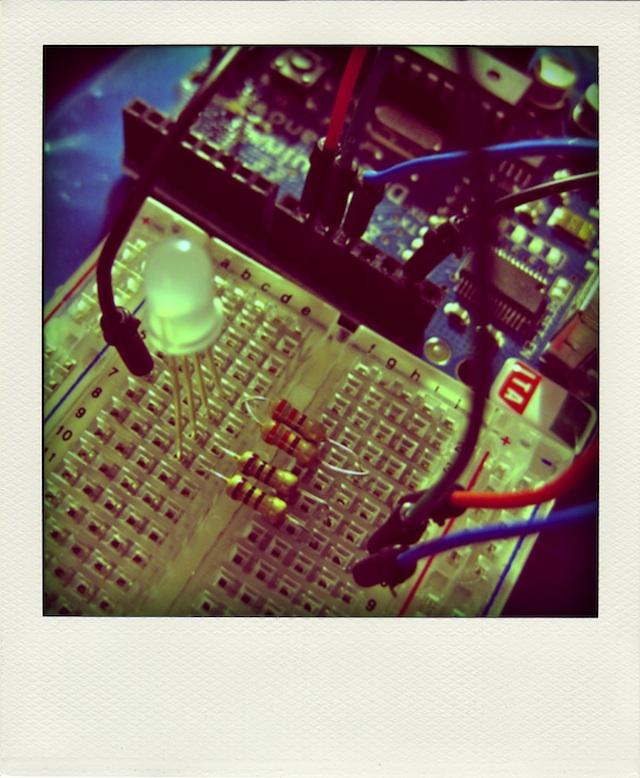
The different resistor values are to provide a limited current to the Triple Output LED RGB – Diffused, as each channel has different requirements. The 165Ω resistor is actually two 330Ω in parallel; I didn’t have the right value, and this was the closest I could make with what I had.
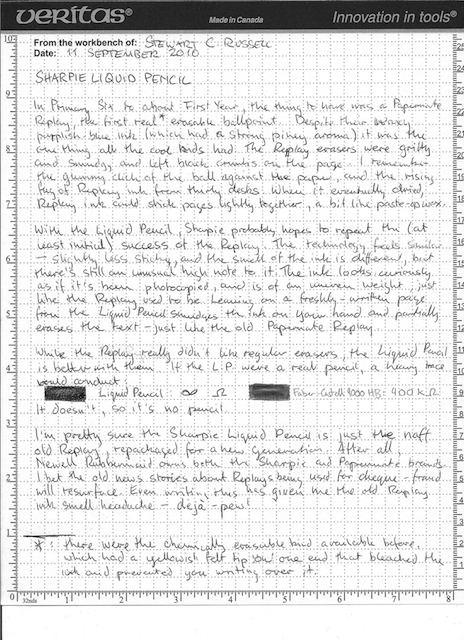
In Primary Six to about First Year [so about 1979 to 1981], the thing to have was a Papermate Replay, the first real* erasable ballpoint. Despite their waxy purplish-blue ink (which had a strong piney aroma) it was the one thing all the cool kids had. The Replay erasers were gritty and smudgy, and left black crumbs on the page. I remember the gummy click of the ball on the paper, and the rising fug of Replay ink from thirty desks. When it eventually dried, Replay ink could stick pages lightly together, a bit like paste-up wax.
With the Liquid Pencil, Sharpie probably hopes to repeat the (at least initial) success of the Replay. The technology feels similar — slightly less sticky, and the smell of the ink is different, but there’s still an unusual high note to it. The ink looks curiously as if it’s been photocopied and is of an uneven weight, just like the Replay used to be. Leaning on a freshly-written page from the Liquid Pencil smudges the ink on your hand and partially erases the text — just like the old Papermate Replay.
While the Replay really didn’t like regular erasers, the Liquid Pencil is better with them. If the LP were a real pencil, a heavy trace would conduct:
███ Liquid Pencil: ∞Ω ███ Faber-Castell 9000 HB: 400kΩ
It doesn’t, so it’s no pencil.
I’m pretty sure the Sharpie Liquid Pencil is just the naff old Replay, repackaged for a new generation. After all, Newell Rubbermaid owns both the Sharpie and Papermate brands. I bet the old news stories about Replays being used for cheque-fraud will resurface. Even writing this has given me the old Replay ink smell headache — déjà pew!
———
* there were the chemically erasable kind available before, which had a yellowish felt tip on one end that bleached the ink and prevented you writing over it.
Unscrewing the barrel revealed the familiar old Papermate Replay refill. I think we’ve been had.
Update: a bunch of reviews. The ones that actually tried it came to pretty much the same conclusion:
Toronto Hydro’s PowerLens for BlackBerry is quite neat:
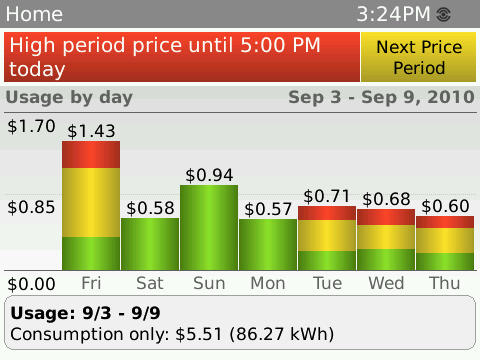 That’s real data from my home meter, folks.